What Is an SSL Certificate in 2026: HTTPS, TLS 1.3 and User Trust
An SSL/TLS certificate moves your site to HTTPS, encrypts data and remains a confirmed Google ranking signal. We break down certificate types, free Let's Encrypt vs paid, and the new 2026 rules.


I will look at your site and answer your questions on the topic of this article. 30 minutes, no slide decks, no pressure.
Book a consultationAn SSL/TLS certificate is a digital file that moves your site to a secure HTTPS connection, encrypts traffic between the browser and the server, and removes the "Not secure" label from the address bar. For most sites a free Let's Encrypt certificate is enough, and HTTPS remains a confirmed Google ranking signal.
Building a good website is hard, and building one that sells is even harder. You have to think about positioning, write articles and pick illustrations. Those are big tasks. But there are small details in website work that feel like formalities. An owner forgets about them — and later it backfires.
One of those "small details" is the SSL certificate. SSL is what moves a site to a secure connection (HTTPS), and that connection reduces the risk of many kinds of online fraud. That is why almost the entire web already runs on HTTPS.
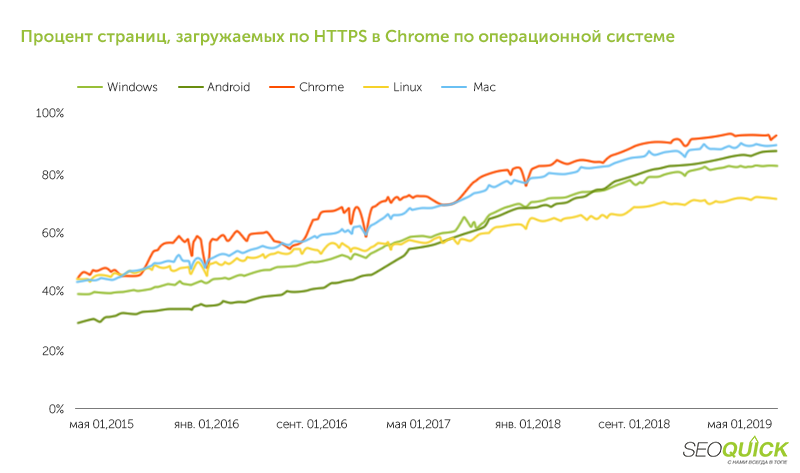
According to Google's data, more than 95 out of 100 sites run on HTTPS, and the share of HTTPS traffic in Chrome has long exceeded 95%. If a site still runs on an insecure connection, browsers mark it as not secure and, when it collects data, block access to it. Search engines also treat such resources worse.
Looking for traffic to your site? SEOquick will bring you 100% organic!
SEO is your long-term, reliable source of traffic from Google and Bing.
We will run full SEO: content, reputation, on-page optimization and link building.
Our SEO is white-hat, and our goal is your move to the TOP! We know exactly what to do and how. Isn't that what you need?
In short, an SSL certificate:
- provides a secure connection and removes browser warnings;
- adds ranking weight and influences traffic growth from search;
- builds visitor trust and reduces bounces and abandoned carts.
But SSL certificates come in different kinds. Below we explain how to choose and obtain the one that helps promote your site, and what changed in 2026.
What SSL is and why you need it
An SSL certificate lets you encrypt transmitted data and make it unreadable to attackers. That is why users trust sites with certificates more, and search engines treat them better. If you are planning a new website build, HTTPS should be enabled from the very start.
The difference between HTTP and HTTPS
You may have noticed that some site addresses start with HTTP and others with HTTPS.
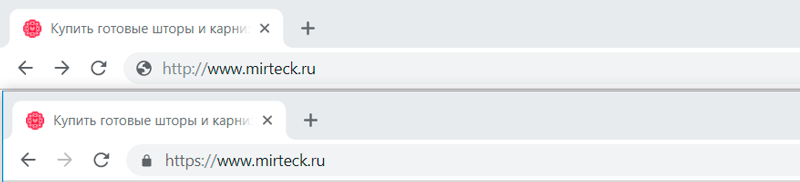
HTTP and HTTPS are data transfer protocols. They carry information from one computer to another over the internet. The letter "S" stands for secure. HTTPS is considered secure because it uses encryption that hides the content of a message from outsiders.
A love note sent over HTTP looks like this: "I love you." The same note over HTTPS looks like gibberish: "j5K82O;ws92/*%ks". To encrypt a message you need cryptographic keys — and those are stored in SSL certificates. So, for a site to start working over HTTPS, you need to install an SSL/TLS certificate on it.
SSL vs TLS: what's the difference
Secure Sockets Layer (SSL) and Transport Layer Security (TLS) are protocols that provide a secure connection over computer networks. TLS is based on SSL and was developed in response to vulnerabilities in older SSL versions. The SSL protocol itself is long obsolete and disabled in browsers, but the term "SSL" is used more often out of habit and today usually means TLS.
The current version is TLS 1.3, released in 2018 and now the default standard. It is faster (fewer handshakes when establishing a connection), more secure and supported by most modern browsers. The 2026 best practice is to enable TLS 1.3 and TLS 1.2 as a fallback, and fully disable the obsolete TLS 1.0 and 1.1.
SSL/TLS provides three things: data encryption, data integrity and authentication. This means that when a connection is secure, you can be sure that:
- no one will read your messages;
- no one will alter your messages in transit;
- you are talking to exactly the server you intended.
How encryption keys work
SSL/TLS encryption uses two keys — public and private. They are different but mathematically linked. If a message is encrypted with the public key, it cannot be decrypted with that same key — you need the private one.
The keys are stored on the same server as the site. The public key is available to everyone: the browser receives it when it contacts the site and encrypts everything it sends with it. The site decrypts that with the private key, and vice versa. If an attacker intercepts the transmitted data, they cannot decrypt it — they do not have the keys.
The trust question and certificate authorities
There is a catch with keys: an attacker could slip the browser their own key and learn the transmitted secrets. That is why browsers do not trust all keys, only ones signed by special organizations — certificate authorities (CAs).
A CA can be compared to a passport office: the office verifies the link between a photo and a person, while a certificate authority verifies the link between a public key and a site. When the browser receives a CA-verified certificate, it stays "calm": the data will be safe. A typical connection looks like this:
- The browser connects to the server over HTTPS.
- The server sends its public key and certificate.
- The browser checks the certificate's signature against its list of trusted CAs.
- The parties agree on a session key.
- All further data exchange is encrypted with that key.
Why HTTPS matters for users and SEO
The largest internet companies have long urged everyone to move to HTTPS. Google is the driving force — its manifesto is literally titled Why HTTPS Matters. This gives two practical reasons to switch to a secure connection.
User trust. If SSL is not installed and the site collects sensitive data, the browser shows a warning or blocks access.
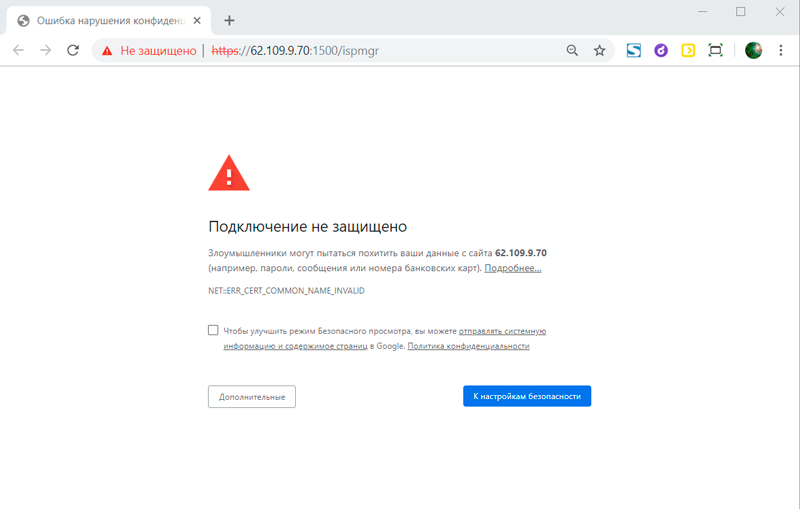
Users leave when they see such warnings. So the absence of SSL reduces traffic and earnings from the site.
An SEO advantage. Google has officially treated HTTPS as a ranking signal since 2014. It is, of course, only one of hundreds of factors, but all else being equal a secure site gets an edge. An extra 2026 nuance: AI crawlers (GPTBot, PerplexityBot, ClaudeBot and others) also prefer HTTPS pages and treat plain HTTP as a less trusted source. For the full picture of factors, see our guide to search engine promotion.
When an SSL certificate is especially essential
Formally, every site needs HTTPS today, but there are cases where you simply cannot go without it:
- The site takes payments or card data. Payment information must be protected — otherwise it can be intercepted and used to steal money.
- There are login forms (username/password). Most people reuse the same passwords across sites, so a leak from your resource can open access to the user's other accounts.
- Any contact-collection forms. People will not leave a phone number or email next to a "Not secure" label.
- You want to keep visitors. Chrome marks all HTTP sites as not secure, and a large share of users leave before the page even loads.
SSL types: which one to choose
Digital certificates come in different kinds, but they all provide equally strong encryption. The difference is in the level of owner verification and how many domains the certificate covers.
Important to understand: for SEO, Google does not distinguish between DV, OV and EV. A free DV certificate gives exactly the same ranking signal as an expensive EV. The type affects trust and legal guarantees, not your positions in search.
Types by validation level: DV, OV, EV
Domain Validation (DV). The lowest level. The CA only checks that the domain belongs to the applicant. Available to both companies and individuals, issued in minutes and fully automatically. The user only sees the padlock and encryption information.
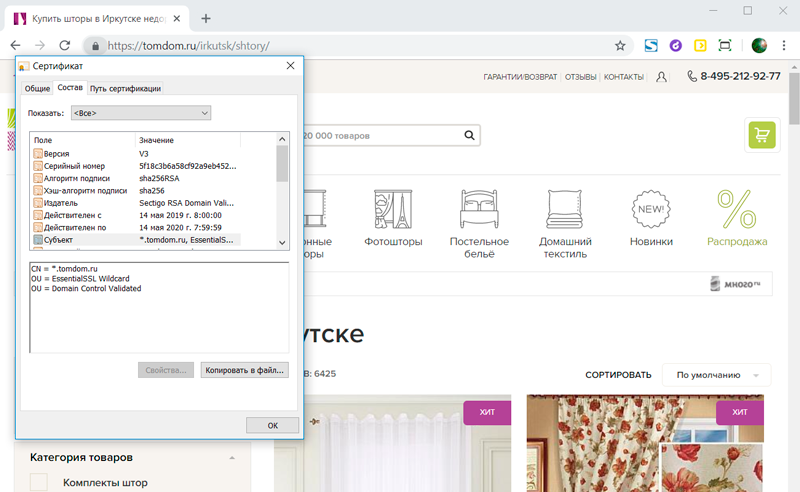
Let's Encrypt issues DV certificates for free. At paid CAs, DV prices start at roughly UAH 400–600 per year — but overpaying for DV almost never makes sense.
Organization Validation (OV). The middle level. The CA confirms not only the domain but also the existence of the company — for example by phone or through third-party registries. The browser shows a padlock, and the certificate details reveal the organization name. Prices are around UAH 1,700–2,500 per year.
Extended Validation (EV). The highest level of assurance. The CA manually verifies domain rights, the legal and physical existence of the company, and consistency with official documents. Standards are set by the international CA/Browser Forum. Because of the manual checks, EV is the most expensive — from UAH 4,000–6,000 per year and up — and available only to legal entities. It is used mainly by banks, financial services and large online stores.
Types by number of domains: single, Wildcard, SAN
A standard certificate protects one domain name. If it is issued for www.mydomain.com, it cannot be used on mail.mydomain.com or www.otherdomain.com.
Wildcard covers a domain and all its subdomains at once. For example, *.mydomain.com works for mail.mydomain.com, www.mydomain.com, shop.mydomain.com and so on. Free Wildcard certificates are also issued by Let's Encrypt (via DNS validation).
SAN (Subject Alternative Name), or multi-domain certificate protects several different domains in a single file — handy if you have several projects on different domain zones.
Which certificate to choose in 2026
- A blog, informational or corporate site without payments — a free DV or Wildcard from Let's Encrypt. That is enough in 9 cases out of 10.
- An online store or service that accepts payments — DV fully covers encryption; if you want to strengthen trust, you can take OV.
- A bank, fintech or large company — EV for maximum legal guarantees and brand recognition in the certificate.
Free Let's Encrypt vs paid certificates
The key thing to remember: the encryption level of a free and a paid certificate is the same. The browser does not "trust" an expensive EV more at the cryptography level. So why pay?
- Warranty. Paid CAs insure users for amounts from $10,000 to $1 million and up in case encryption fails. Free certificates have no such warranty.
- Validation level. Let's Encrypt issues only DV. OV and EV with the company name displayed can be obtained only from paid authorities.
- Support. With a paid certificate you get CA technical support; with a free one you have to figure things out from the documentation yourself.
- Lifespan and auto-renewal. Let's Encrypt issues certificates for 90 days with auto-renewal via an ACME client (for example, Certbot). That is a plus, not a minus — automation removes the risk of "forgetting to renew".
For the vast majority of sites, free Let's Encrypt is more than enough. Paid makes sense when legal guarantees or brand recognition matter (banks, finance, large e-commerce).
How to obtain and install an SSL certificate
The procedure is not complicated, but it takes from a few minutes (for DV) to a couple of days (for EV). Let's go step by step.
Step 1. Choose a certificate authority
A CA signs SSL certificates with a root certificate that is installed in all popular browsers — that is how the browser recognizes a "good" certificate. Among international authorities: DigiCert, Sectigo, GlobalSign, GeoTrust and others. For DV there is no real difference between them. Let's Encrypt stands apart — it issues DV for free and automatically.
Step 2. Buy or issue the certificate
A paid SSL can be bought directly from a CA, through resellers, or from your hosting provider — and providers often help with installation too. In Ukraine most hosts (for example, neutrally: your current hosting provider) offer both free one-click Let's Encrypt and paid certificates. A free DV or Wildcard is issued right in the hosting control panel at no cost.
Step 3. Request the certificate (for paid ones)
For DV it is enough to confirm control over the domain (by email or DNS). For OV/EV you will need to provide the legal name, real address and phone of the company. The seller generates a CSR and a private key — keep them safe. DV activation takes minutes, OV takes hours, EV takes up to several days due to manual verification.
Step 4. Install the certificate and enable HTTPS
After issuance you receive the certificate itself, the root and intermediate certificates, and the private key. All of this is installed on the hosting or server — via panels like cPanel, Plesk, ISPmanager, or with the provider's support. For free Let's Encrypt the easiest path is Certbot — it requests, installs and renews certificates automatically.
After installation the site will work over HTTPS, but the old HTTP will still be reachable. To move every request to the secure connection, set up a 301 redirect from HTTP to HTTPS and update internal links, canonicals and the sitemap.
Step 5. Close the "technical debt" after the switch
After migrating to HTTPS, check three more things:
- Mixed content. If a HTTPS page still loads images, scripts or styles over HTTP, the browser "breaks" the padlock. Find such resources via the browser console and move them to HTTPS.
- HSTS. The HTTP Strict Transport Security header forces the browser to always connect over HTTPS. Enable it only after the migration is fully stable, and start with a short max-age.
- Lifespan and monitoring. As of March 2026 the maximum lifetime of public certificates has been cut to 200 days, and it is set to drop further — to 100 and then 47 days. So manual renewal becomes risky: set up auto-renewal and expiry alerts.
Note! When you move to HTTPS the site address changes, and Google may temporarily treat it as new. To avoid losing positions, follow Google's official guide on site moves with URL changes and, if needed, order a technical audit.
FAQ: common questions about SSL certificates
Is a free SSL worse than a paid one for SEO?
No. Google does not distinguish DV, OV and EV — what matters for ranking is HTTPS itself. A free DV from Let's Encrypt gives the same SEO effect as an expensive EV.
Which is better — SSL or TLS?
The technically correct term is TLS, while "SSL" is used out of habit. The SSL protocol itself is obsolete and disabled. The modern standard is TLS 1.3; obsolete versions (SSL, TLS 1.0/1.1) should be disabled on the server.
How often do you need to renew a certificate?
Let's Encrypt lasts 90 days and renews automatically. As of March 2026 the maximum lifetime of any public certificate is 200 days, and it will keep shrinking. So the best strategy is auto-renewal, not a manual renewal once a year.
What is a Wildcard certificate?
It is a certificate of the form *.mydomain.com that protects a domain and all its subdomains in a single file. A free Wildcard can be obtained from Let's Encrypt via DNS validation.
Why does my site still say "Not secure" after installing SSL?
The most common cause is mixed content: some resources (images, scripts, styles) load over HTTP. Find them in the browser console and move them to HTTPS, and set up a 301 redirect from all HTTP to HTTPS.
Does a small one-page site without forms need SSL?
Yes. Even without forms, Chrome marks HTTP sites as not secure, and HTTPS remains a ranking signal. Free Let's Encrypt closes the question entirely.
Remember
- An SSL/TLS certificate is essential for almost every site: it moves it to HTTPS, encrypts data and removes the "Not secure" label.
- HTTPS is a confirmed Google ranking signal, but for SEO the certificate type (DV/OV/EV) does not matter.
- For 9 out of 10 sites a free DV or Wildcard from Let's Encrypt with auto-renewal is enough.
- A paid OV/EV is needed for legal guarantees and brand recognition — by banks, finance and large e-commerce.
- In 2026 watch the lifespan (now 200 days) and clear mixed content after moving to HTTPS.
Why AI Cites Your Site But Never Names Your Brand
I analysed 751 Google AI Overview answers for my own domain and found the factor that decides whether your brand gets named: where your link sits in the source list. Plus six prompts to audit your brand in ten minutes.
Read →
Making Money Online in 2026: Which Methods Actually Work
An honest breakdown of making money online in 2026: why 'easy money with no investment' is a myth, 5 models that actually work, and how to monetize your own site with affiliate and CPA — by SEOquick.
Read →
Google AI Mode in 2026: What It Is and How to Prepare Your Site for Conversational Search
What Google AI Mode is, why CTR is falling and how to get cited in its answers. A SEOquick breakdown: 1B users, 93% zero-click queries and a working 2026 checklist.
Read →Want to apply this to your site?
We will review the current situation, find the first growth levers, and suggest a practical working format.