SEO for Blogs, News Sites and Online Media: The Complete 2026 Guide
News sites and blogs play by different SEO rules: what matters here is publishing speed, E-E-A-T and getting into Top Stories and Discover — not classic keyword research. Here is how media outlets can survive and grow in the age of AI Overviews, from NewsArticle schema to a strategy for dealing with AI crawlers.


I will look at your site and answer your questions on the topic of this article. 30 minutes, no slide decks, no pressure.
Book a consultationHundreds of guides have been written about promoting an online store or a corporate website. But an informational site, a blog or a media outlet cannot be grown with those methods: media have a different content economy, different traffic entry points and different requirements from Google.
I wrote the first version of this guide back in 2017 — news aggregators and RSS feeds were the main channels then. In 2026 the picture is different: Google News no longer requires an inclusion application, Discover brings publishers more traffic than search does, and AI Overviews eat away clicks, forcing newsrooms to choose between blocking AI crawlers and negotiating with them.
This guide is about promoting a news site, a media outlet and a content blog in today’s reality.
In short: SEO for a news site in 2026 means fast indexing (a news sitemap, server-side NewsArticle schema), E-E-A-T signals (author pages, an editorial policy, links to primary sources), Google Discover optimization (images of 1200 px and up,
max-image-preview:large, Core Web Vitals) and a deliberate strategy for AI Overviews. You no longer need to apply to Google News — content gets in automatically if it complies with Google’s policies.
How SEO for Media Differs from Classic SEO
The key difference is the content life cycle and the traffic sources.
| Parameter | Commercial site | News site / blog |
|---|---|---|
| Page lifespan | Years (evergreen service pages) | Hours to days for news, months for long reads |
| Traffic source | Organic search driven by keywords | Top Stories, Discover, News, search, social media |
| Indexing speed | Not critical | Critical: measured in minutes |
| Key ranking factor | Relevance + links | Publisher authority + freshness + E-E-A-T |
| Keyword research | Done in advance | Forecast from news hooks and trends |
The practical takeaway: a news site has to work on two levels. The news level — speed, aggregators, Top Stories. The evergreen level — guides, analysis and reviews that collect search traffic for months and keep the site afloat between news cycles.
SEOquick experience. We worked on the news portal bb.lv — one of the largest Russian-language media outlets in Latvia. Thanks to reworked category pages, internal linking and technical optimization, key sections reached the top 1-3 positions in Google Latvia, and the portal steadily collects around 78,000 organic visits per month. Details are in our news portal case study (in Russian).
Content Requirements
Content is what users come to a media site for. The requirements have not softened over the years — they have tightened: Google filters clickbait, thin rewrites and texts with no signs of real expertise ever more aggressively.
1. Headlines Without Clickbait
A headline must match the content. Clickbait (“You won’t believe what he did…”) is a direct violation of Google News policies and the main Discover filter: Google’s systems demote material whose headline distorts or exaggerates the content.
A working formula for a news headline: fact + specifics + a number where appropriate. Keep the tone neutral, with no exclamation marks or loaded adjectives. The title tag matches the H1, and the meta description teases the news rather than duplicating the headline.
2. News Story Structure
The classic “inverted pyramid” still works — both for readers and for AI systems that extract answers from text:
- Lede: the gist of the news in the first 1-2 paragraphs (who, what, where, when).
- Body: details, quotes, context.
- Background: links to previous coverage of the topic and to primary sources.
Every news item comes with a unique illustration or photo — a requirement for Top Stories and especially for Discover.
3. Linking to Sources Is E-E-A-T
Citing the primary source is not politeness — it is a trust factor. Link to original research, official statements and documents. Embed social media posts as widgets, not as text links. If a fact turns out to be unconfirmed, the link to the source protects the outlet’s reputation: you publish a correction without losing trust.
Internal links matter just as much: connect each news item to earlier stories and topical long reads. For Google this signals the site’s topical expertise; for the reader it is a path deeper into the site.
4. Tags and Categories
Tags are the internal semantics of a media site. The rules are simple:
- One tag per entity: “iPhone 17” and “Apple iPhone 17” are one tag, not two.
- A tag leads to a clean URL like
/tag/iphone-17/with a list of related materials. - No empty or single-use tags — they breed thin pages and burn the crawl budget.
Categories split content by topic (politics, economy, technology). A news item belongs to one category; merge categories with fewer than 5-10 articles. The category structure should mirror how Google News categorizes content — it simplifies automatic classification.
5. Objectivity and Facts
Fewer value judgments outside the “Opinion” section. Do not accuse anyone of an offense before a court ruling — that is both a legal risk and a trust risk. More on what quality text looks like in our content guide (in Russian).

Technical Requirements
The technical foundation of a media site decides whether a news item makes it into the search results on time. A checklist by priority.
URLs and Indexing
- Permanent, short URLs (3-5 words), with no system leftovers like
index.php. - Minimal nesting:
/category/news-headline/. - A regular
sitemap.xmlfor the whole site, plus a separate news sitemap for material from the last 48 hours (1,000 URLs maximum). This is the main mechanism of fast news indexing. - Duplicate pages closed off; non-unique republications set to
noindex.
Speed and Core Web Vitals
After Google decoupled Top Stories from AMP, it is Core Web Vitals on regular HTML pages that determine a news story’s “career” in the results. Targets: LCP under 2.5 seconds, INP under 200 ms, CLS under 0.1. Check them with PageSpeed Insights and the Core Web Vitals report in Search Console.
A particular pain point of news sites is ad scripts that break CLS and slow down LCP. Load ads asynchronously and reserve space for them in the layout.
And the basics: HTTPS is mandatory (without it there is no Discover and no Top Stories), the hosting must handle traffic spikes, and Cloudflare or an equivalent protects against DDoS.
Mobile Version
More than half of news traffic comes from mobile devices, and Discover exists only on mobile. Google’s indexing has long been mobile-first: anything missing from the mobile version does not exist for Google. Responsive layout, readable fonts and no aggressive interstitial pop-ups are the bare minimum.
AMP, once mandatory for news carousels, offers no advantages in 2026: major publishers migrated to plain fast HTML long ago.
CMS and Structured Markup
WordPress remains the most popular platform for blogs and smaller outlets — we have a dedicated WordPress SEO guide (in Russian). Whatever the CMS, it must let you manage meta tags and canonicals, output server-side JSON-LD markup, generate a news sitemap, and serve OpenGraph tags for correct previews in social networks and messengers.
Before launch and after a redesign, run a technical audit — with news publishers we most often catch broken links to outdated stories, redirect chains and bloated tag archives.
Schema Markup for News Sites
Structured data matters more for media in 2026 than ever before: markup is used not only by Google’s classic systems but also by AI Mode and AI Overviews — to verify the source, establish relationships between entities and assess credibility when assembling an answer.
The baseline set for a publisher:
- NewsArticle for news; Article/BlogPosting for long reads and the blog. Required properties:
headline,image(in three aspect ratios — 1:1, 4:3, 16:9),authorwith a name and a link to the author page,datePublished,dateModified. - Organization at the site level: the publication’s name, logo, contacts, social profiles.
- BreadcrumbList — the navigation trail.
- VideoObject — if you publish video.
For live coverage (elections, matches, emergencies) use LiveBlogPosting with the coverageStartTime and coverageEndTime properties — Google marks such material with a LIVE badge in the results. There is no need to duplicate NewsArticle: LiveBlogPosting is self-sufficient.
A critical detail: JSON-LD must be served in the initial HTML from the server, not rendered later by JavaScript. For news, where indexing is a race, client-side markup rendering means lost time and lost positions.
Google News and Top Stories in 2026
This is where the biggest change of recent years happened — and not everyone knows about it yet.
You no longer need to apply to Google News. Google automatically considers all web content for inclusion in News, Top Stories and the News tab of search. The manual review publishers used to go through (that form in Publisher Center with a three-week wait) has been abolished. Content that complies with the Google News policies automatically becomes a candidate for display.
What this means in practice:
- Publisher Center is now needed mainly for monetization (Reader Revenue Manager) and basic publication settings — Google removed custom sections and publication page styling; publication pages in News are generated automatically.
- Ranking in news surfaces is determined by relevance, the publisher’s authority, freshness, location and language. Authority is built over months of consistent work in your beat — a niche publication with expertise beats a general-purpose portal on its own turf.
- Top Stories is the main prize: the carousel above the organic results for trending queries. Requirements: fast indexing (a news sitemap + server-side NewsArticle), Core Web Vitals, original content, a recognizable publication.
The content Google explicitly bans or ignores in news surfaces has not changed: weather forecasts, schedules, horoscopes, announcements of future events, sponsored posts, and humor without a “satire” label.
Preferred Sources: A New Loyalty Factor
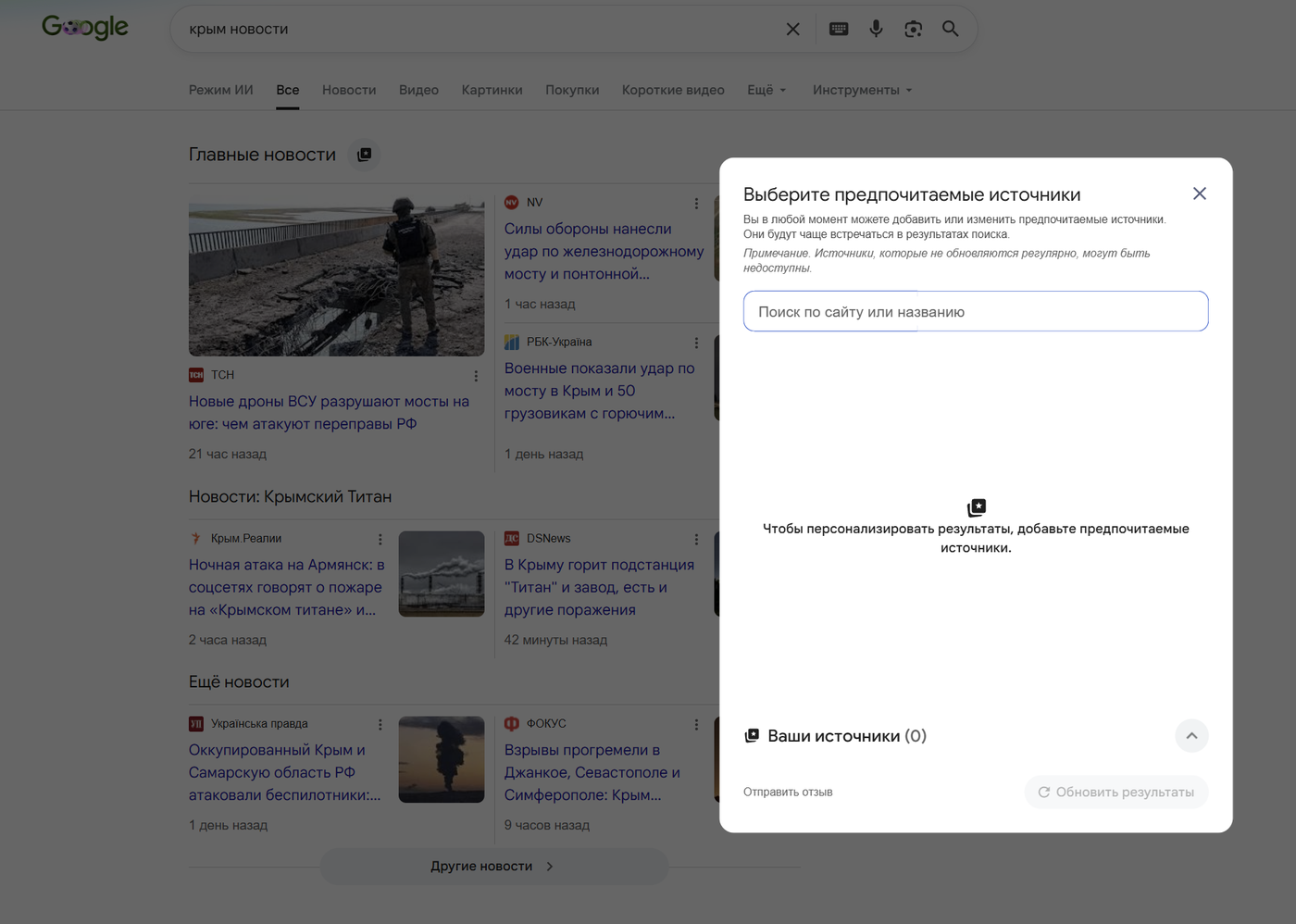
In late 2025 Google launched — and by 2026 rolled out globally — the Preferred Sources feature: users can star their favorite publications right in the Top Stories block and see them more often, including in a dedicated “From your sources” block. According to Google, users are twice as likely to click through to a site after adding it to their preferred sources, and since May 2026 the choice is also factored into AI Overviews and AI Mode.
The takeaway for a publisher: a loyal audience has become a direct visibility factor. Place a direct link for adding your publication to Preferred Sources (the format is google.com/preferences/source?q=your-domain) on your site and in your newsletters — it is a free boost to impressions. Note: only domains and subdomains qualify; a /blog/ subfolder on someone else’s domain will not make it into the tool.
Google Discover: The Main Traffic Source for Media
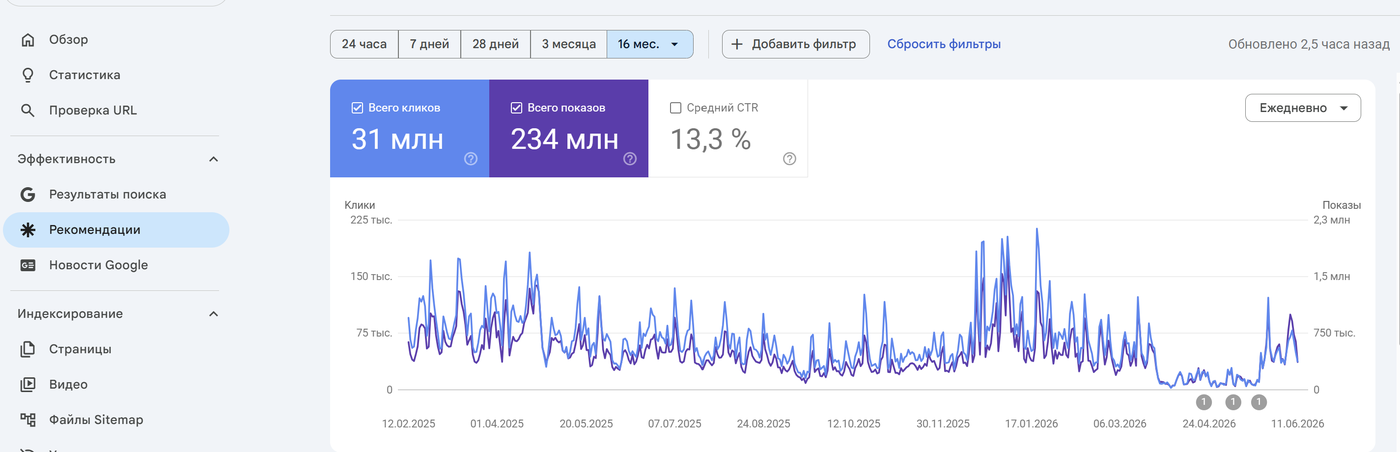
Discover is the personalized feed in the Google app and on the Android/iOS home screen. For many publishers it is already the number one traffic source: the feed’s audience exceeds 800 million users, and a single Discover hit can bring more visits in a day than weeks of search organic.
The catch with Discover is that you cannot “optimize for a query”: there are no keywords; the algorithm builds the feed around each user’s interests. But there are verifiable inclusion factors.
Discover Optimization Checklist
- Images at least 1200 px wide, ideally 16:9. Small images = a small card = low CTR.
- The
max-image-preview:largerobots meta tag — without it Google will not show a large card. This is the most common technical miss. - A strong headline with no clickbait. Discover aggressively filters exaggeration, withholding information “for the click” and headlines that do not match the content.
- E-E-A-T signals: author pages, topical expertise, links to sources. Discover favors sites with proven expertise in their niche.
- Core Web Vitals and HTTPS — mandatory hygiene.
- Publishing regularity. The algorithm adjusts crawl frequency to your rhythm: a stable schedule means stable crawling.
- Topics with emotional and visual potential perform better: personal stories, deep dives, “how it works” pieces, local events.
Discover traffic arrives in sharp spikes and fades within 48-72 hours — factor that into your content plan and do not build your business model on Discover alone: the feed is volatile, and dips are normal. Track performance in the dedicated Discover report in Search Console.
E-E-A-T for Media: Trust as a Ranking Factor
For news sites and blogs, E-E-A-T (experience, expertise, authoritativeness, trust) is not an abstraction from the quality rater guidelines but a concrete set of site elements that Google knows how to find and evaluate. After every Core Update we see the same pattern: media without these signals lose visibility first.
Author Pages: The Mandatory Minimum
Every article has a real author with their own page: photo, bio, specialization, credentials, links to profiles (LinkedIn, X) and other publications. Attributing all content to “Editorial team” is an anti-signal. The author page is connected to articles via the author property in schema markup.
Publisher Transparency
- An “About us” page: who publishes the outlet, who the editor-in-chief is, how to get in touch.
- An editorial policy: how you verify facts, how you correct errors, how you separate advertising from editorial content.
- Contacts and legal information in a visible place, as required by media law in the country you operate in.
Fact-Checking
Links to primary sources in every article, public corrections with a dated note, and a clear separation of opinion from fact. The ClaimReview markup that fact-checkers used to annotate claim reviews was sunset by Google in 2026 — fact-check snippets are gone from the results, so the bet is now on reputation and transparent processes rather than special markup.
SEOquick experience. E-E-A-T signals work beyond the classic search results too. After we built out expertise signals for a client’s medical website (doctor pages, sources, structured content), it made it into Google’s AI answers for 26,714 queries — details in our medical website case study (in Russian). The mechanics are the same for media: AI systems cite those they trust.
AI Overviews and News Content: Block or Adapt
The most painful question for media in 2026. AI Overviews — generated answers above the search results — take clicks away from publishers: according to the Pew Research Center, users who see an AI Overview are 47% less likely to click through to websites, and some publishers report a 10-25% drop in search traffic.

Blocking AI Crawlers: Pros and Cons
The first reaction of many newsrooms is to shut content off from AI bots in robots.txt. According to industry research, around 79% of major world publishers already block one AI bot or another. But the decision is not as obvious as it seems.
Arguments for blocking:
- Content is a publisher’s main asset; giving it away for model training for free means subsidizing a competitor.
- Blocking is a negotiating position: licensing deals with AI companies (the route taken by News Corp, The Atlantic, Vox Media, Associated Press) were struck first and foremost by those whose content could not be taken for free.
Arguments against:
- For Google, the search crawler and the crawler for AI search features are one and the same Googlebot. You technically cannot block AI Overviews separately from search: the
Google-Extendedtoken only opts you out of Gemini model training, not out of AI Overviews. A full block means dropping out of search. - Visibility in AI answers brings both traffic and brand awareness: ChatGPT Search, Perplexity and AI Mode link to their sources, and those visits convert. A Reuters Institute study (2026) showed the reverse effect of blocking: publishers that shut out AI crawlers lost 14-23% of traffic on average, per Comscore and SimilarWeb data.
- The audience will get the answer anyway — but with a link to a competitor who did not block.
What We Recommend to Media
- Do not block Googlebot or AI search crawlers (OAI-SearchBot, PerplexityBot) — these are distribution channels, just as aggregators once were.
- Make the training-bot decision deliberately (GPTBot, Google-Extended, CCBot): for large publishers with a unique archive, blocking creates a negotiating position for licensing; for smaller blogs, openness and citability pay off more.
- Optimize content for citation: direct answers at the top of the article, clear definitions, structure, markup. How that is done — see our guides on GEO: optimizing a site for GPT and getting content into AI answers.
- Shift value to where AI cannot reach: exclusives, investigations, proprietary data, analysis with a point of view. AI has devalued retellable news — unique content has gone up in price.
- Grow direct channels: newsletters, Telegram, push notifications, apps — traffic that does not depend on algorithms.
Our collection of 50 mega-prompts for ChatGPT and Gemini will help newsrooms work with AI tools, and the basics of using ChatGPT for SEO tasks are in our complete ChatGPT for SEO guide.

Web Stories: Briefly
Web Stories is Google’s full-screen, AMP-based story format shown in Discover and search. The hype around the format has passed: in 2026 it is a niche tool, not a mandatory part of the strategy.
When it makes sense: visual verticals (travel, food, lifestyle, sports) with a steady pipeline of imagery. The technical requirements are a valid AMP story with the publisher-logo-src, poster-portrait-src, title and publisher metadata. If your newsroom’s resources are limited, put them into Discover optimization of regular articles instead — the return is higher.
The Evergreen Layer: What Holds Traffic Between News Cycles
News brings spikes, but the stable organic traffic of a media site comes from evergreen content: guides, explainers, rankings, “how it works” pieces. At strong publications it generates up to half of all search traffic.
How to build this layer:
- Connect news to hubs. For every recurring storyline (tariffs, elections, a technology) create a hub page with a foundational explainer and link every related news item to it. The hub accumulates link equity and ranks for high-volume queries.
- Update rather than multiply. Refreshing a guide with up-to-date data and a new
dateModifiedusually brings more traffic than a brand-new article. In our projects, rewriting outdated content consistently yields a 20-30% gain per page. - Mine search suggestions around news hooks. After a news spike there is a trail of “what does it mean”, “how will it affect”, “what to do” queries — ready-made explainer topics that live for months.
- Set up internal search and a “Popular” block — they increase session depth and help redistribute weight to important materials.
Moderate the comments under your articles and answer questions: an active discussion is a behavioral signal and a source of topics for new material.
Distribution: Social Media, Messengers, RSS
Media diversify search traffic with direct channels — in 2026 this is not a nice-to-have but insurance against algorithms.
- A Telegram channel — for Ukrainian and many Eastern European media the number one channel: news is delivered instantly and the audience belongs to you. It takes a minute to create and grows through mutual mentions, on-site widgets and the quality of the feed.
- Facebook and Instagram — create a page (not a group) with the “Media/News company” type and set up auto-posting of teasers. Targeted ads on your best material work for reaching cold audiences.
- Viber communities — still a notable channel for local news in Ukraine, where Viber remains widely used.
- X (Twitter) — for tech, finance and the international agenda; verify the publication’s account to protect against fakes posted in your name.
- YouTube and Shorts — video versions of explainers and reports; embed the videos into articles (that is both time on page and an extra entry point from video search).
- RSS and email newsletters — RSS is alive: Feedly, Flipboard and niche aggregators deliver steady traffic, and email remains the highest-converting retention channel. A full-text feed plus a regular digest is the minimum program.
- Bing News (Microsoft Start) — Bing’s share is modest, but the Microsoft news feed is preinstalled in Windows; getting listed via Bing Pub Hub is free and takes up to a week of review.
The cross-posting principle: one news item → an adaptation for each platform’s format, not a copy-pasted link. And everywhere — a link back to the site, where the full version and the monetization live.
FAQ
How do I add a site to Google News in 2026?
You don’t — and that is good news. Applications have been abolished: Google automatically considers all content that complies with Google News policies for display in News, Top Stories and the News tab. Your job is technical readiness (a news sitemap, NewsArticle schema, speed) and content quality, not passing a review.
What is Google Discover and how do I get into it?
Discover is the personalized content feed in the Google app and on Android/iOS — for many media outlets, the main traffic source. There is no guaranteed entry, but your chances are determined by: images of 1200 px and up with the max-image-preview:large tag, strong non-clickbait headlines, E-E-A-T signals, Core Web Vitals and publishing regularity.
Does a news site need AMP?
No. Since 2021 Top Stories has not required AMP, and by 2026 the format offers no advantages — major publishers have moved off it. Instead of AMP, invest in the Core Web Vitals of your regular pages: LCP under 2.5 s, INP under 200 ms, CLS under 0.1.
Should a news site block AI crawlers?
Do not block AI search crawlers (Googlebot, OAI-SearchBot, PerplexityBot) — you would lose both AI visibility and regular search: studies record a 14-23% traffic drop at publishers that blocked them. The training-bot decision (GPTBot, Google-Extended) is strategic: blocking makes sense as a negotiating position for a licensing deal.
What schema markup does a news site need?
The minimum: NewsArticle (or BlogPosting for a blog) with headline, image in three aspect ratios, author, datePublished and dateModified; Organization for the publisher; BreadcrumbList. For live coverage — LiveBlogPosting with coverageStartTime/coverageEndTime. Serve the markup server-side in the initial HTML — it is read both by search engines and by AI models when they choose their sources.
How does SEO for a blog differ from SEO for a news site?
A blog lives on evergreen content: keywords are researched in advance, articles bring traffic for months, and updating old material yields more than writing new pieces. A news site lives on speed: indexing within minutes, Top Stories, Discover — and content goes stale within 48-72 hours. Strong media combine both layers.
SEO mistakes on commercial sites: why traffic does not turn into sales
Typical SEO mistakes on eCommerce and service sites: irrelevant blog, weak structure, unnecessary FAQ, redirects, schema, UX, and conversion.
Read →
Website development cost in 2026 and what drives it
A landing page from $176 to $2,000, an online store from $335 to $6,700 — measured across 17 Ukrainian price lists. What website development cost is made of, why a “from” figure means nothing, what we charge and how long each type of site takes.
Read →
SEO Trends 2026: 10 Changes You Need to Prepare For Right Now
The key SEO trends of 2026: AI Overviews on 48% of queries, 68% zero-click, the rise of ChatGPT and Google AI Mode. What is changing in search and how to prepare your site — a breakdown by SEOquick.
Read →Want to apply this to your site?
We will review the current situation, find the first growth levers, and suggest a practical working format.