YouTube Video Promotion in 2026: Algorithm, Optimization, Monetization
In 2026, the YouTube algorithm doesn't rank videos — it ranks viewer reactions: thumbnail click-through rate, retention, and session continuation matter far more than tags and descriptions. I break down the entire promotion system — from test impressions and Shorts to monetization and the channel-to-site-to-leads funnel — using our own 800+ video channel as the example.


I will look at your site and answer your questions on the topic of this article. 30 minutes, no slide decks, no pressure.
Book a consultationI’ve been running the SEOquick channel (our SEO agency’s channel) since 2017: 800+ videos, 48,000 subscribers, and — most importantly — a steady stream of client inquiries coming directly from YouTube. In that time the platform has changed beyond recognition: tags have stopped mattering, Shorts arrived, A/B thumbnail testing got built right into YouTube Studio, and long-form videos started getting cited in Google’s AI answers.
That’s why the old checklists — “write 30 tags and put your keyword in the description” — no longer work. This article is a complete rebuild of our video promotion guide for the realities of 2026: how the recommendation algorithm actually works, what to optimize first, how to use Shorts, and how much you can earn.
And yes — all of this has been tested on our own channel, not retold from other people’s blogs.
How to promote a YouTube video in 2026: create content for a specific search query or audience interest, push for a high thumbnail CTR (readable text, a face, one idea), hold the viewer through the first 30 seconds and to the end of the video, and use keywords in the title, description, and captions. The algorithm promotes videos that viewers watch to the end and that keep them on the platform — not videos with the “right tags.”
How the YouTube Algorithm Works in 2026
YouTube stopped being “search by tags” a long time ago. It’s a recommendation system that predicts, for each individual viewer: will they click this video, will they finish it, and will they stay on the platform afterward.
Here are the signals that actually affect reach, in order of importance:
| Signal | What it measures | Where to check |
|---|---|---|
| Thumbnail CTR | How often people click your video from feed and search impressions | Studio → Analytics → Reach |
| Retention | What share of the video people watch and where they drop off | Studio → Analytics → Engagement |
| Session continuation | Whether the viewer stayed on YouTube after your video | Indirectly: impressions-to-views from recommendations |
| Satisfaction | Likes, survey responses, “Not interested” clicks, returns to the channel | YouTube surveys, subscriber dynamics |
| Query relevance | How well the title, description, and captions match the search query | Traffic from YouTube search |
Notice: tags are not in this table. YouTube’s own help documentation states plainly that tags play a “minimal role” and mainly help with common misspellings of brand names. The time you used to spend picking 30 tags is better invested in 2026 in your thumbnail and the first 30 seconds of the video.
How Test Impressions Work
When you publish a video, the algorithm doesn’t “decide its fate” once and for all. It works in iterations:
- The video is shown to a small sample — primarily your active subscribers and viewers with similar interests.
- The system measures CTR and retention on that sample.
- If the metrics beat competing videos in the same feeds, the sample expands. If they’re lower, impressions fade out.
- The cycle repeats: a video can take off a week or even a month later if its metrics turn out strong on some iteration.
The practical takeaway: the first 24–48 hours are critical, because your subscribers form the initial sample. If they don’t click the thumbnail, the algorithm will decide the video is weak before a cold audience ever sees it. That’s why announcing the video to your Telegram channel, email list, and social media on publication day isn’t “marketing busywork” — it directly shapes your starting metrics.
A/B Thumbnail Testing: Test & Compare
Since 2024, YouTube Studio has had a built-in tool called Test & Compare: you upload up to three thumbnail variants, YouTube splits impressions between them, and then picks the winner based on the watch time share each variant generated.
You used to need a paid TubeBuddy subscription for this — now the feature is free for all channels. We run every new video on our channel through Test & Compare: the difference between a “good” and the “best” thumbnail regularly reaches 20–30% of watch time.

YouTube Is the World’s Second-Largest Search Engine — and a Source of AI Citations
YouTube remains the second-largest search engine after Google — and simultaneously the world’s second most visited website. But in 2026, a new reason to make video joined the classic ones: videos get pulled into AI answers.
What’s changed:
- Google increasingly embeds videos in AI Overviews and AI Mode: according to BrightEdge, the share of AI answers with video blocks has been growing steadily since 2024 — video gets cited as a source alongside text pages.
- According to OtterlyAI research, 94% of YouTube links cited by AI systems lead to long-form reference videos — guides, tutorials, deep dives. Not Shorts and not vlogs.
- ChatGPT, Gemini, and Perplexity can read video captions and summarize their content — which means a well-structured video with captions becomes a “knowledge source” for AI models.
The practical takeaway: if your goal is traffic and brand awareness rather than just views, bet on long-form educational videos with clear structure, timestamps, and captions. Those are the videos that collect search traffic for years and get cited in AI answers.
SEOquick’s experience: betting on AI-answer citability works beyond video. A medical website we promote appears in Google’s AI answers for 26,714 queries — a direct result of structured expert content. Details in our medical website promotion case study (in Russian).
Step 1. Research Your Niche and Competitors
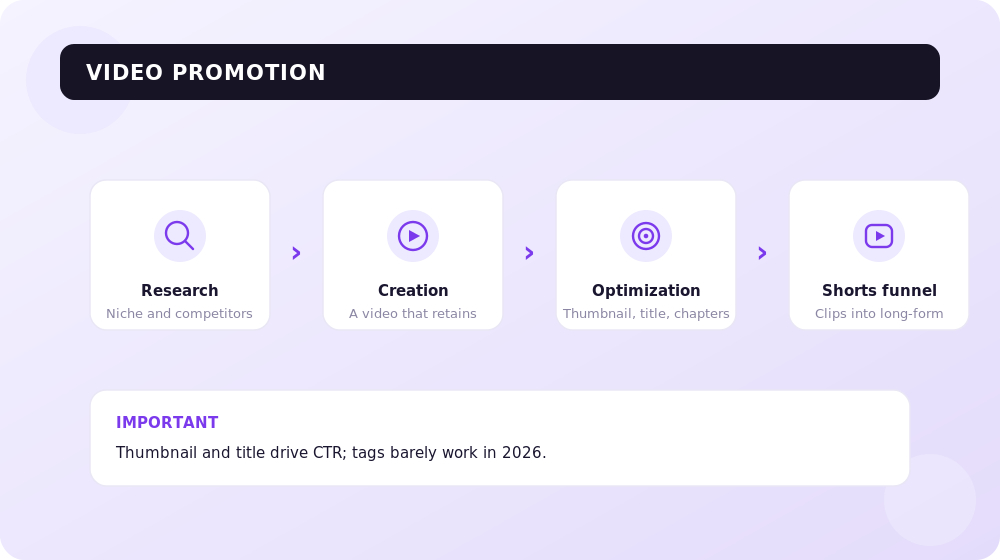
Before you film anything, you need to understand what already works in your niche. YouTube hosts hundreds of millions of videos — your job isn’t to “cover everything” but to find topics with proven demand and weak competition.
Competitor Analysis
The process:
- Type your niche’s main query into YouTube search with the “Channels” filter and build a list of competitors with 1,000+ subscribers.
- On each channel, sort videos by popularity — that’s a demand map of the niche across the channel’s entire history.
- Separately, review videos from the last 3–6 months: which ones are getting more views than the channel’s average? Those are the current trends.
- Note the leaders’ formats: reviews, tutorials, rankings, mistake breakdowns, interviews.
The fastest way to find “abnormally successful” videos is the Outliers feature in vidIQ: it surfaces videos that pulled in several times more views than a channel of that size normally gets. These are ready-made topic ideas with proven demand.
Search Queries for Video
YouTube keyword research draws on three sources:
- YouTube search suggestions — type in a keyword and write down the autocomplete options (including suggestions with alphabet letters appended after the keyword).
- vidIQ / TubeBuddy — show query volume and competition level right inside the YouTube interface.
- Google Trends (the “YouTube Search” tab) — demand dynamics for a topic and comparison of different phrasings.
A rule proven across our 800 videos: one video = one search intent. A “everything about SEO in 4 hours” video will collect less search traffic than ten separate videos answering ten specific questions.
Step 2. Create a Video That Holds Attention
No amount of optimization will save a boring video. Retention is the algorithm’s second-strongest signal, and it’s determined at the script stage, not in editing.
Script and Structure
- Write the script in advance — at least as bullet points. Improvisation almost always means filler, and filler kills retention.
- Build the video on this scheme: hook (what the viewer will get) → content without long preambles → conclusion and a bridge to the next video.
- Cut everything that doesn’t serve the video’s topic. The viewer came for an answer, not for “first, let me tell you about my week.”
The First 30 Seconds Decide Everything
The biggest audience drop-off happens in the first 15–30 seconds. What to do:
- Start with the point: state which question the video will answer and why you can be trusted.
- Don’t insert long branded intros — in 2026 that’s a guaranteed way to lose 20% of viewers before the content even starts.
- Show the “bait”: a shot of the result, a number, an intrigue that pays off later.
Working with the Retention Curve
After publishing, always study the retention curve in YouTube Studio (Analytics → Engagement):
- A sharp drop at the start — a problem with the hook, or a mismatch between thumbnail and content.
- A dip in the middle — a dragging segment: cut sections like that in future videos.
- Peaks on the curve — moments people rewatch. That’s a hint about which topics deserve standalone videos.
Over 18 years of working with content, we’ve learned this: systematically reviewing the retention curve after every video improves your next videos faster than any “algorithm secrets.”
Step 3. Optimize the Video
In 2026, optimization means first the thumbnail and title (they determine CTR), then the description, timestamps, and captions (they determine relevance), and only at the very end — tags.

Thumbnail
The thumbnail is the main driver of clicks. Rules that work:
- One idea per thumbnail. A viewer looks at a thumbnail for less than a second — it has to register instantly.
- Large text, 3–5 words maximum, readable on a smartphone screen. The text shouldn’t duplicate the title — it should complement it.
- A face with emotion lifts CTR in most niches — people click on people.
- No more than two graphic elements and contrasting brand colors — so your channel is recognizable in the feed.
- Run every thumbnail through Test & Compare — let viewers decide, not your taste.
Title
The title works in tandem with the thumbnail and is responsible for query relevance:
- Put the main keyword at the beginning of the title.
- The first 40–45 characters must convey the point: feeds truncate long titles.
- Total length — up to 60 characters: a title that long displays fully both on YouTube and in Google’s results.
- Add a click trigger: a number, a benefit, an intrigue — but no clickbait that the content doesn’t back up. Betrayed expectations = retention collapse = death of reach.
Description
- The first 1–2 sentences are the most important: they’re visible above the “Show more” button and land in search snippets.
- Describe the video’s content in natural language with key phrases — the description is indexed by both YouTube and Google.
- Add links: to your website, to a relevant article, to related videos and playlists.
Timestamps
Timestamps (chapters) are mandatory for videos longer than 5–7 minutes:
- The viewer sees the structure and finds what they need faster — which improves retention, not hurts it.
- Google shows video chapters right in search results (“key moments”).
- Chapter titles are extra occurrences of your key phrases.
The format is simple: a “00:00 Chapter name” list in the description, with the first stamp always at 00:00.
Captions
Captions are an underrated lever in 2026:
- YouTube’s automatic captions garble terminology — upload corrected ones, especially for expert content.
- Caption text is indexed and used by AI systems: it’s through captions that ChatGPT and Gemini “understand” what a video is about and cite it.
- Translated captions open your video to other language markets almost for free.
Tags: The Honest Truth — They Barely Work
Tags are the last thing worth spending time on. YouTube officially confirms: the video’s content, title, thumbnail, and description matter orders of magnitude more. Fill in the field in two minutes — the main keyword, 3–5 variations and synonyms, common misspellings of your brand — and forget about it. No “30 perfectly chosen tags” will rescue a video with weak CTR and retention.
Shorts: A Funnel for Channel Growth
Shorts are the fastest way to gain reach and subscribers in 2026 — with one important caveat: on their own, Shorts barely monetize and barely sell.
Compare the economics of the two formats (vidIQ data; averages vary widely by niche):
| Metric | Shorts | Long-form videos |
|---|---|---|
| Speed of gaining reach | Very high | Low at the start |
| RPM (revenue per 1,000 views) | Cents — around $0.05–0.1 | From $1 to $20+ in commercial niches |
| Video lifespan | Days | Years (search traffic) |
| Viewer-to-client conversion | Minimal | High (trust built through expertise) |
| Citability in AI answers | Practically zero | High (94% of AI citations are long-form) |
That’s why the working strategy is a Shorts → long-form funnel:
- Cut 2–4 vertical clips with the strongest takeaways from every long video.
- In Shorts, use the “Related video” feature — a link to the full video.
- Shorts gather a cold audience and subscribers; long-form videos convert them into regular viewers and clients.
Track Shorts analytics separately: they have their own metrics — the viewed-vs-swiped-away rate matters more than CTR, because thumbnails aren’t shown in the Shorts feed.
vidIQ or TubeBuddy: Which to Choose in 2026
The two main YouTuber tools. At SEOquick we use vidIQ, but here’s an honest comparison of both (2026 prices, billed annually):
| vidIQ | TubeBuddy | |
|---|---|---|
| Free plan | Yes: basic metrics, keyword volume | Yes: basic tools, limited quotas |
| Entry paid plan | Boost — from ~$16.58/mo | Pro — from ~$2.25/mo |
| Top plan | Max — $39/mo (AI tools, credits) | Legend — from ~$14.50/mo |
| Coaching | Coaching — from $99/mo | — |
| Strengths | Keyword research, Outliers (finding abnormally successful videos), AI generation of ideas and titles, daily channel ideas | Bulk metadata editing, publishing checklists, low price |
| Weaknesses | More expensive | Weaker keyword analytics; thumbnail A/B tests lost their uniqueness after Test & Compare launched |
In short: vidIQ is about research and ideas, TubeBuddy is about routine and savings. For a channel growing on search and recommendation traffic, vidIQ is more useful; for a large video catalog where descriptions need bulk editing — TubeBuddy. You can start with the free versions of both.
Monetization: YPP Thresholds in 2026
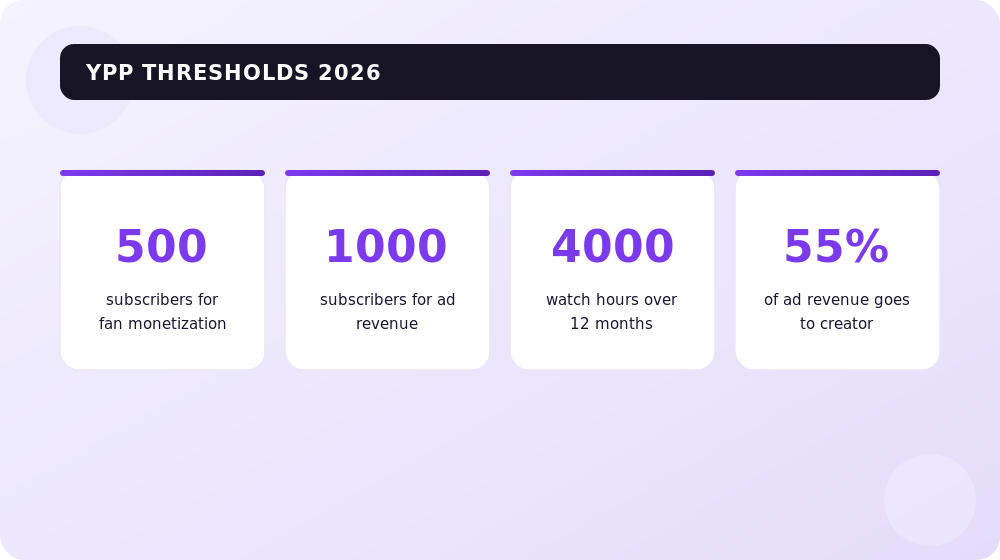
The YouTube Partner Program (YPP) has two tiers in 2026:
Tier 1 — fan funding (from 500 subscribers):
- 500+ subscribers;
- 3 public videos in the last 90 days;
- 3,000 watch hours over 12 months or 3 million Shorts views over 90 days.
Available: channel memberships, Super Chat and Super Stickers, YouTube Shopping. No ad revenue at this tier yet.
Tier 2 — full monetization (from 1,000 subscribers):
- 1,000+ subscribers;
- 4,000 watch hours of long-form video over 12 months or 10 million Shorts views over 90 days.
This unlocks ad revenue sharing: 55% to the creator / 45% to YouTube for ads on long-form videos, and 45% to the creator from the overall Shorts revenue pool (music licensing fees are deducted from the pool first).
Plus the standard conditions: a linked AdSense account, two-factor authentication, no active strikes, and compliance with monetization policies.
An important reality check: for most expert and B2B channels, ad revenue is a nice bonus, not a business model. Channels like that make their real money from videos bringing in clients.

And a separate word on “fast” methods: buying subscribers and views in 2026 isn’t just useless — it poisons the starting metrics of your test impressions. Bots don’t watch videos, CTR and retention collapse, and the algorithm stops showing your videos even to a live audience.
The Channel → Site → Leads Funnel: Why a Business Needs YouTube
Let me show you a live example. The SEOquick channel has 800+ videos and 48,000 subscribers. By entertainment-YouTube standards, that’s modest. But the channel consistently does the three things a business actually needs YouTube for:
- It brings leads directly. A viewer watches a breakdown, becomes convinced of the expertise, and submits an inquiry for SEO services. Video sells trust better than any landing page: the person has already “known” you for half an hour.
- It strengthens the website. Videos are embedded in blog articles — they increase time on page and earn the articles rich video snippets in Google.
- It works for years. Videos from 2019 still bring views and inquiries — it’s the most evergreen traffic channel of all the ones we use.
How to build such a funnel:
- Make videos answering the questions your clients actually ask (not “what’s trending”).
- In the description and pinned comment, link to a relevant page of your site — not just the homepage.
- Embed videos in your site’s articles and mark them up with VideoObject schema — that’s how a video appears in Google search results together with the page.
- Build remarketing audiences: linking your channel to Google Ads lets you show ads to people who watched your videos.
SEOquick’s experience: the content funnel works in reverse too — the site strengthens the channel, and expert content brings clients from new sources. Nadomu.kiev.ua, a Ukrainian home-services website, grew its organic traffic 10x while working with us and started receiving conversions from ChatGPT — clients come because the brand is cited in AI answers. More in our services website promotion case study (in Russian).
Podcasts and Live Streams: Briefly
Two formats worth keeping in mind, but not betting on as priority number one:
- Podcasts. YouTube has become the world’s largest podcast platform, overtaking Spotify by audience. If you record a podcast, publish it on YouTube too (as a podcast playlist) — that’s free reach. But there’s no need to launch a podcast “for the algorithm”: the format demands consistency and builds recognition, not search traffic.
- Live streams. Live broadcasts are great for warming up an existing audience (Q&A sessions, breakdowns), generating Super Chats, and producing raw material for clips. They work poorly for cold reach — it’s a community-retention tool, not an acquisition tool.
Both formats produce clipping material: one two-hour stream yields 5–10 Shorts and 2–3 topical videos.
Video Promotion Checklist
- Topic chosen based on demand analysis (search, Outliers, competitors); one video = one intent.
- Script with a hook in the first 30 seconds, no filler.
- Thumbnail: one idea, large text, tested via Test & Compare.
- Title: keyword up front, the point within the first 40 characters, up to 60 characters total.
- Description with key phrases and links, timestamps, corrected captions.
- Announcement to subscribers in the first hours (social media, newsletter, channel community tab).
- 2–4 Shorts cut from the video, each linking to the full version.
- Video embedded on your site with VideoObject markup.
- A week later — review the retention curve and CTR, draw conclusions for the next video.
Conclusions
YouTube promotion in 2026 boils down to a simple formula: clickable thumbnail × retention × consistency. The algorithm doesn’t “promote” or “bury” channels — it scales viewer reactions. If people click and watch to the end during test impressions, reach grows on its own.
Everything else is tooling around that formula: Shorts accelerate audience growth, long-form videos convert it into clients and AI citations, vidIQ helps find topics, and the channel → site → leads funnel turns views into money. Tags, “magic” services, and bought engagement — a miss.
Start small: pick the ten questions your clients ask most often and film ten honest, well-structured answers to them. In six months, that playlist will be working for you better than any ad budget.
FAQ
How do I promote a YouTube video for free?
Pick a topic with confirmed demand (search suggestions, vidIQ), make a clickable thumbnail and strong first 30 seconds, optimize the title and description for the target query, and add timestamps and captions. On publication day, announce the video to your subscribers and on social media — the starting metrics determine whether the algorithm expands impressions.
What matters more to the YouTube algorithm: tags or retention?
Retention — by an incomparable margin. Tags play a minimal role in 2026: YouTube itself confirms they mainly help with misspelled brand names. The algorithm scales impressions for videos with high thumbnail CTR, strong retention, and continued sessions after viewing.
How many subscribers do you need for monetization in 2026?
Two thresholds. From 500 subscribers (plus 3 videos in 90 days and 3,000 watch hours or 3 million Shorts views), fan funding opens up: memberships, Super Chat, YouTube Shopping. From 1,000 subscribers and 4,000 watch hours (or 10 million Shorts views in 90 days) — full monetization with a 55% ad revenue share.
Do Shorts help promote a channel?
Yes, but as the top of the funnel. Shorts gain reach and subscribers quickly, yet they barely monetize (RPM in cents) and barely sell. The working scheme: cut Shorts from long videos, set the “Related video” link, and convert the Shorts audience into viewers of long-form videos, which bring revenue and clients.
Do YouTube videos appear in Google and ChatGPT AI answers?
Yes. Google embeds videos in AI Overviews, while ChatGPT and Gemini read captions and cite videos as sources. According to OtterlyAI, 94% of YouTube citations in AI answers are long-form reference videos: guides, tutorials, deep dives. Structure, timestamps, and corrected captions raise your chances of being cited.
Is it worth buying subscribers and views?
No. Bots don’t watch videos — they crash CTR and retention during test impressions, and the algorithm stops recommending your videos to real audiences. On top of that, fake engagement violates YouTube’s policies and can cost a channel its monetization. What works faster: the Shorts funnel, collaborations, and announcements to your existing base.
How to Build a YouTube Channel for Business in 2026: A Step-by-Step Growth Guide
Who needs their own YouTube blog and how to launch a channel for business in 2026: niche, Shorts vs long-form, YouTube SEO, AI tools, analytics and monetization.
Read →
YouTube Channel Design in 2026: Banner, Avatar & Thumbnail Sizes + AI Tools
How to design a YouTube channel in 2026: current banner size 2560×1440 with a 1546×423 safe zone, avatar, video thumbnails, branding, trailer, and AI design tools.
Read →
X (formerly Twitter) promotion for business in 2026: a marketing guide
How to promote a business on X (formerly Twitter) in 2026: the For You algorithm, post formats, threads, video, Spaces, X Premium, and X Ads. Content plan and analytics.
Read →Want to apply this to your site?
We will review the current situation, find the first growth levers, and suggest a practical working format.