Instagram Profile Design in 2026: A Guide to Design, SEO and Sales
A searchable name, a keyword-rich bio, an avatar, a unified visual and the current 2026 sizes — building an Instagram profile that gets found and that sells.


I will look at your site and answer your questions on the topic of this article. 30 minutes, no slide decks, no pressure.
Book a consultationDesigning an Instagram profile in 2026 comes down to five connected elements: a name and username with keywords (profiles are now found through search and AI suggestions), a bio of up to 150 characters with a clear offer, a 320×320 avatar, a unified feed visual and covers for your highlights. The sizes have changed too: the feed now displays as vertical 4:5 tiles (1080×1350), while 3:4 (1080×1440) can be posted without cropping. Below is a step-by-step guide to building an account the algorithm understands and a person remembers.
Many people are still convinced that Instagram is a social network for selfies and photos of food. But while some hesitate, others earn from a personal brand, advertising and sales straight from the profile.
In 2026, Instagram stopped being just a "gallery of pictures." It is a search engine inside the social network: the algorithm reads your name, username, bio text, post captions, image alt-text and even the audio in your Reels to figure out who to show you to. So designing a profile is no longer only about looking good — it is about whether you get found at all.
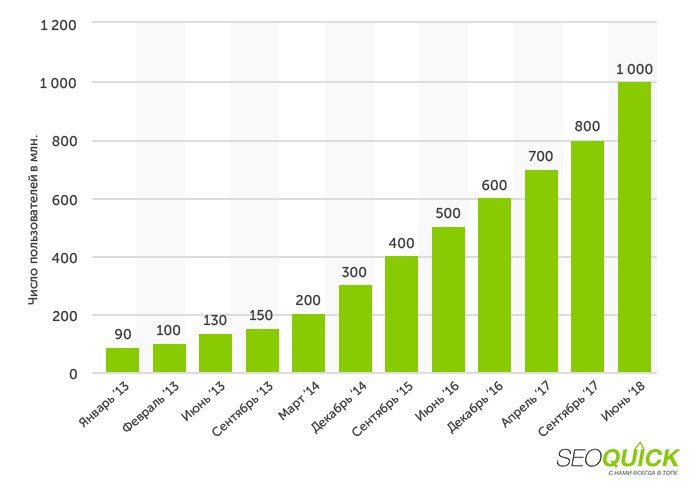
The audience is growing, and with it the competition. In Ukraine, Instagram long ago spread beyond the capital: active communities of bloggers and stores exist in Kyiv, Lviv, Kharkiv, Dnipro, Odesa and smaller cities like Chernivtsi and Ternopil. So the question is not "do I need Instagram," but "how do I design a profile that stands out."
What does your competitor have that you don't yet? That's right – traffic. SEOquick to the rescue!
We'll bring a mass of traffic to your site through SEO.
We'll do it exclusively with white-hat methods, without filters or penalties from Google.
We'll carry out deep optimization: strengthen your content, build up links and reputation. And it will all work out!
Alongside design, it is worth building systematic promotion — for example, through video marketing and Reels, and through comprehensive Instagram promotion. But everything starts from the basics — from the profile itself. Let's break it down element by element.
Why bother with profile design in 2026
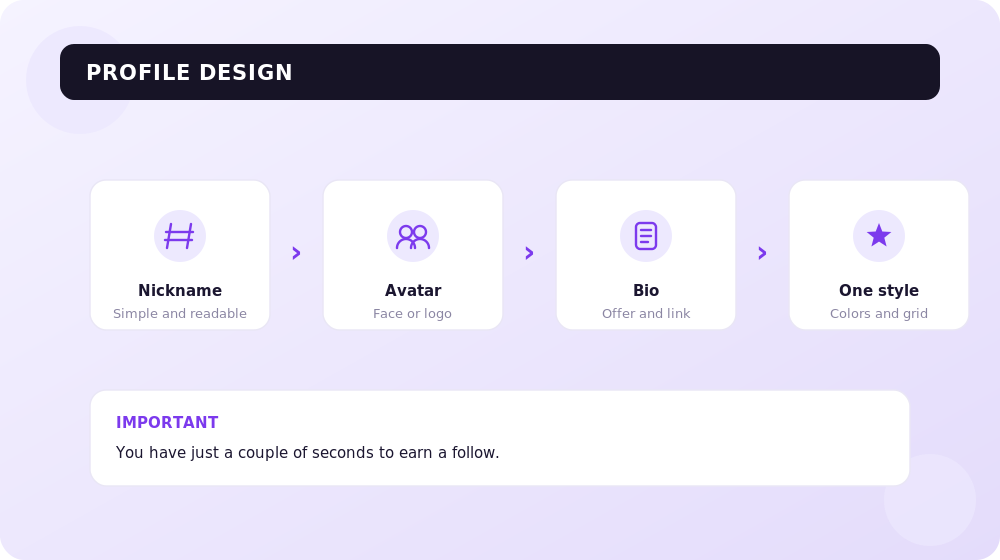
Instagram is a visual social network, and the first impression here decides almost everything. But "design" is not only about photos. It is a set of signals: the nickname, the username, the avatar, the bio, the unified feed visual, the covers of your highlights and the texts. Each of them works toward two goals: appealing to a person and being clear to the algorithm.
Why does a business, an expert or a blogger need this? So the profile becomes an additional sales channel and an entry point into the funnel. For a store, a psychologist, a photographer, a cleaning company — for everyone whose goal is to attract clients through social media.
In 2026, good design gained a third function, on top of "beautiful" and "clear":
- Findability (Instagram SEO). The algorithm indexes your name, username, bio and captions. If your profile contains the words "wedding photographer Kyiv," you'll be shown for that query in search and recommendations.
- Signals for AI. Instagram heavily uses machine learning, so image alt-text, on-topic captions and a consistent profile theme help the system classify you correctly.
- Consistency. Your name, username, bio and pinned posts should all say the same thing. If your bio says "travel blogger" but your feed is fitness, the algorithm gets confused and recommends you less.
If you're short on content or time — it's solvable. You can bring in a freelancer, assign an employee, or use AI design tools (more on them below) that assemble unified-style templates in minutes. The main thing is to treat the profile as a storefront, not a personal photo album.
Nickname and username: the foundation of Instagram SEO
The name and username are far from a formality. In 2026 they are the two main search fields of the profile, and both are indexed by Instagram. It's important not to confuse them.
The nickname (username, the @-handle) is the page's address in Latin letters: letters, numbers, dots, underscores. It's what people tag you by and find you with through a direct link. A few rules:
- The nick should be memorable. You shouldn't name a profile @annushkakrasavica12011976 — it's long and not memorable at all.
- Avoid the sounds "sh," "shch," "ch": in transliteration they produce clunky combinations that are hard to type and remember.
- Don't use several underscores in a row — they're impossible to count, which means it's impossible to find exactly you. Allowed: @_auto_market_ua, but not @___auto__market__ua.
- Come up with a unique name. Logins like @magazin_sonechko, @sonechko.shop are almost certainly taken — and possibly by your competitors.
- New in 2026: where possible, weave a keyword or niche into the username. An account with a keyword in its handle, name or bio shows up in search and recommendations more often.
Username (Name) — that field under the avatar
This is the bold text under the nick. And it's largely what Instagram builds search on. If you type "wedding photographer," the results will include profiles that have those words in the name field.
- If you're not yet an opinion leader, put a search query in the name field instead of "Masha Ivanova": "Personal coach | Kyiv." You only have ~70 characters — pack your main keyword into them.
- Use your audience's language. Don't write "Tasty recipes" if your blog is in Ukrainian — no one will search in English expecting to see Ukrainian content.
- Combine a keyword and a hook: "Cosmetologist | no pain, no swelling" works better than a dry "Cosmetologist."
- If you use emojis in your name, separate them with a space, otherwise Instagram will treat everything as one word and "eat" your search visibility.
The rule is simple: the username (@) is for recall and tags, the name field is for keywords. Together they shape your findability.
Recommended reading:
Profile photo (avatar): size and branding
The avatar is small, but you shouldn't underestimate it. It's the first thing people see when they subscribe, in tags and in notifications.
The current avatar size in 2026 is 320×320 px, but it's better to upload an image of 400×400 or larger so it stays sharp. The picture is displayed as a circle, so keep important details in the center and away from the edges. The color profile should be sRGB only: if you save the layout in CMYK, the colors will turn dull after uploading.
What to choose:
- For a business and brand — a logo or signature mark that's readable even in a small circle. No long inscriptions that merge together.
- For an expert and blogger — a large, bright portrait facing the camera, on a contrasting background.
- For a store — a recognizable mark or key product, not a random selfie.
What to avoid: meaningless abstractions, small text, a dark "mush" of details. The avatar should tell people who you are in a fraction of a second. If you don't have your own photo — AI avatar generators (Fotor, Canva, headshot services) produce a neat portrait from an ordinary shot in minutes.
Profile bio (header): 150 characters and up to 5 links
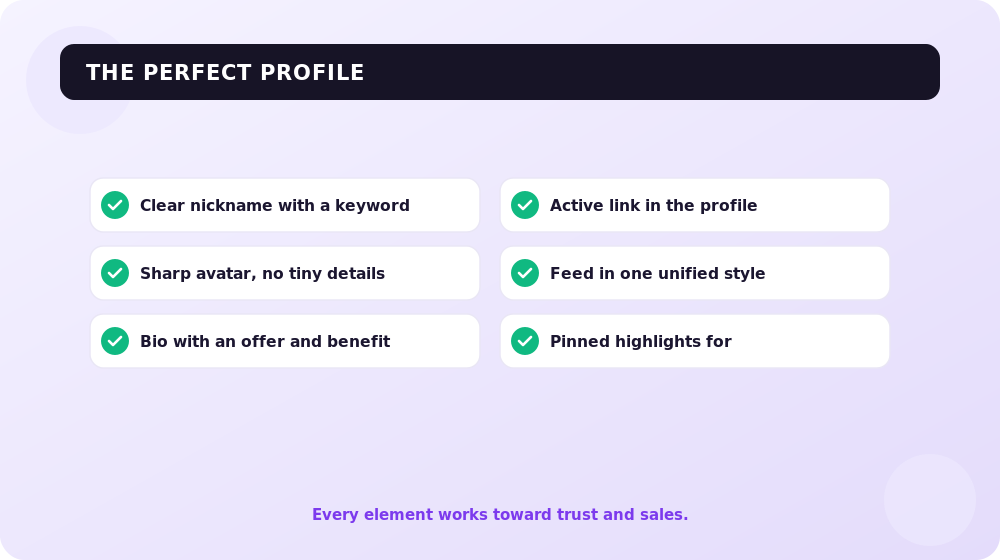
The bio is the "home page" of your profile. You still have 150 characters, and it's by them that the algorithm and the person decide whether to stay or keep scrolling. In 2026, an important SEO rule was added to the bio: the first line should immediately state your niche and, where relevant, your city.
How to build a strong bio:
- First line — niche + keyword + geo. For example: "SMM agency for beauty salons | Kyiv." This lets the algorithm understand what the account is about and helps you get into search.
- Second — offer and USP. How you differ, what pain you solve. Add a proof point here too (experience, numbers, a case).
- Third — call to action + link. "Free audit → tap the button."
- Insert keywords naturally. Over-stuffing doesn't help SEO and hurts readability.
- A couple of emojis are fine as visual "markers" for lines, but don't fill the whole bio with them.
About links. Instagram now lets you add up to 5 clickable links right in the bio (in "Edit profile" → "Links"). This removes the old "one link for everything" pain, but only the first link shows in the header itself, with the rest hidden behind a drop-down, and Instagram doesn't track the clicks. That's why many brands still use a single link-in-bio (Linktree, with an audience of over 50 million users, Beacons, Later with store integration): it gives branding, click analytics and a neat "mini-landing page." The logic is simple: put your most profitable offer as the most prominent button at the top.
For business accounts, don't forget the contact buttons: "Edit profile" → "Contact options" → add an email, address and phone number. It's both convenient for the client and an extra signal.
If a business reaches beyond social media, it makes sense to connect the profile to the website and to an end-to-end search promotion strategy — then traffic from Instagram converts systematically, not "on luck."
A unified visual and the new 4:5 profile grid
A tidy, recognizable feed still builds trust. But in 2026 the grid format itself changed, and you need to take this into account when planning.
The main change: the profile grid became vertical. Post previews are displayed in 4:5 format (1080×1350 px), and Instagram itself supports uploading 3:4 (1080×1440) without cropping — convenient for portraits and product shots. Old square mosaics "glued" from several posts effectively stopped working: content is cropped in the new way. On the other hand, in June 2026 Instagram launched the long-awaited grid drag-and-drop feature — you can now rearrange the feed manually without deleting posts.
Current sizes for 2026:
- Avatar: 320×320 px (upload 400×400+).
- Feed posts: vertical 4:5 — 1080×1350 px (the recommended format), and also 3:4 — 1080×1440 px without cropping; square 1:1 — 1080×1080 px.
- Reels and Stories: 1080×1920 px, 9:16 ratio.
- Color profile — sRGB only.
Ideas for a unified style that still work now:
- One accent color across all posts — the simplest way to pull the feed together.
- Alternating formats in a clear rhythm: visual → text card → Reels cover.
- Branded templates with a logo and unified typography — they protect content and hold the style.
- Thoughtful Reels covers in vertical 4:5, since they now shape the first impression of the feed.
Unlocking the feed's potential is closely tied to video content: Reels in 2026 are the main reach driver, and their covers should fit into the overall profile visual.
AI tools for profile design
In 2026, assembling a unified visual got faster thanks to AI. A few tools that save hours:
- Canva Magic Design and Brand Kit — generate posts, covers and stories in a unified style, automatically applying your colors, fonts and logo. One Brand Kit — and the whole profile keeps the brand style.
- AI avatars (Fotor, Canva, headshot services) — produce a neat avatar portrait from an ordinary photo.
- Feed planners (Flick, Later, Pallyy) — show what the 4:5 grid will look like before posting, so you can assemble a harmonious feed in advance.
- AI captions and alt-text — help you add keywords naturally and give the algorithm more signals about the content's topic.
Important: AI is a helper, not a replacement for meaning. A template will assemble the picture, but the offer, tone and value are still on you.
Highlights: covers and structure
Pinned stories under the header are the profile's mini-menu and a point of trust. Many users look at them first, not at the feed.
How to design highlights in 2026:
- Shoot stories regularly — it's the best place for live content that doesn't fit into a polished feed.
- Set up permanent categories: "Reviews," "Prices," "Delivery," "About us," "Cases" — the things clients ask about most often.
- Make unified covers in the profile's style. The easiest way is the free canva.com: an icon or a short word on a brand background.
- The order of highlights matters: put your most sales-driving categories on the left, since they're seen first.
Neat highlight covers look like a continuation of the header and noticeably raise the perceived quality of the account. Unstyled "system" circles, on the contrary, break the whole visual.
FAQ: common questions about designing Instagram in 2026
What is the avatar size on Instagram in 2026?
It's displayed at 320×320 px, but it's better to upload an image of 400×400 px or larger for sharpness. The avatar is cropped into a circle, so keep key elements centered, and use the sRGB color profile.
What are the current sizes for posts and Reels?
The feed is displayed as vertical 4:5 tiles (1080×1350 px) — that's the recommended format. It also supports 3:4 (1080×1440 px) without cropping and square 1:1 (1080×1080 px). Reels and Stories are 1080×1920 px, 9:16 ratio.
What matters more for search — the username or the profile name?
Both are indexed. The username (@) is needed for tags and recall, while the name field is the main place for a keyword. If you're not well known yet, put a search query with your niche and city in the name field.
How many links can you add to a bio?
Instagram now lets you add up to 5 clickable links right in the bio. However, only the first one shows in the header, the rest sit behind a drop-down, and Instagram doesn't track clicks. That's why many brands use a single link-in-bio tool (Linktree, Beacons, Later) for branding, analytics and a convenient "mini-landing page."
Do mosaics made of several posts still work?
Practically no. After the grid switched to the vertical 4:5 format, old square mosaics are cropped incorrectly. On the other hand, since June 2026 you can drag and rearrange feed posts manually.
Do you need to specify the city and niche in the profile?
Yes. In 2026, the first line of the bio and the name field should immediately state the niche and, where relevant, the city — it's a key signal both for users and for Instagram search.
Conclusions
- Designing an Instagram profile in 2026 is a system of name, username, avatar, bio, unified visual and highlights that works toward findability and sales.
- The name and username are the main Instagram SEO fields: the @-handle for recall, the name field for the keyword.
- Bio: 150 characters, first line — niche + geo, up to 5 links or a single link-in-bio with analytics.
- 2026 sizes: avatar 320×320, feed 4:5 (1080×1350) and 3:4 without cropping, Reels/Stories 1080×1920.
- The grid became vertical, mosaics don't work, but manual drag-and-drop of posts has appeared.
- AI tools (Canva, Fotor, Flick) speed up assembling a unified visual — but the meaning and offer are still on you.
Recommended articles on the topic
HOOKING CLIENTS WITH GREAT PHOTOS: SETTING UP TARGETING ON INSTAGRAM (GUIDE)
2 SECRET WAYS TO USE INSTAGRAM FROM A COMPUTER: UPLOADING PHOTOS, VIDEOS, STORIES
16 SERVICES FOR AUTOPOSTING ON SOCIAL NETWORKS: AN OVERVIEW
5 SERVICES FOR COLLECTING INSTAGRAM STATISTICS: CHOOSING THE PERFECT ONE
YouTube Channel Design in 2026: Banner, Avatar & Thumbnail Sizes + AI Tools
How to design a YouTube channel in 2026: current banner size 2560×1440 with a 1546×423 safe zone, avatar, video thumbnails, branding, trailer, and AI design tools.
Read →
Email CTR: how to calculate, analyze, and increase clicks
A practical email CTR guide: segments, subject, preheader, CTA, design, mobile, landing page, deliverability, and the sales connection.
Read →
A/B Testing in 2026: How to Boost Site Conversion with a Split Test (Step-by-Step Guide)
What A/B testing is and how to run a split test correctly in 2026: hypotheses, statistical significance, sample size, tools after Google Optimize sunset, AI experiments, and the link between CRO and SEO.
Read →Want to apply this to your site?
We will review the current situation, find the first growth levers, and suggest a practical working format.