Instagram business account in 2026: how to create, set up and promote it
The complete 2026 guide: how to create and set up an Instagram business account, how it differs from Creator and personal, what the updated Insights show, and how to promote your profile without burning budget.


I will look at your site and answer your questions on the topic of this article. 30 minutes, no slide decks, no pressure.
Book a consultationAn Instagram business account is a free type of professional profile that unlocks Insights analytics, contact buttons, product tags and the Meta ads manager. You can switch in 5 minutes right inside the app, with no follower minimum, and revert at any time. If you sell products or services in Ukraine and are still on a personal page, you are losing the data that helps you grow. In this guide we break down how everything works in 2026.
In an era where every second person calls themselves a blogger and almost every manicurist is a beauty-industry business owner, not developing your Instagram is lost revenue. Luckily, today you can sell without leaving home: all you need is desire, time and a properly configured profile.
Every successful commercial page shares one foundation: visual design, content, a distinctive approach — and always a professional account under the hood.
Ищешь трафик на свой сайт? SEOquick привлечет тебе 100% органику!
SEO – ваш долгосрочный и надежный источник трафика из поисковых систем Google и Bing.
Сделаем комплексное SEO-продвижение: контент, репутация, внутренняя оптимизация, линкбилдинг.
Наше SEO – белое, наши цели – ваш выход в ТОП! Мы знаем точно: что и как. Вам же именно это надо?
What an Instagram business account is and how it differs from the others
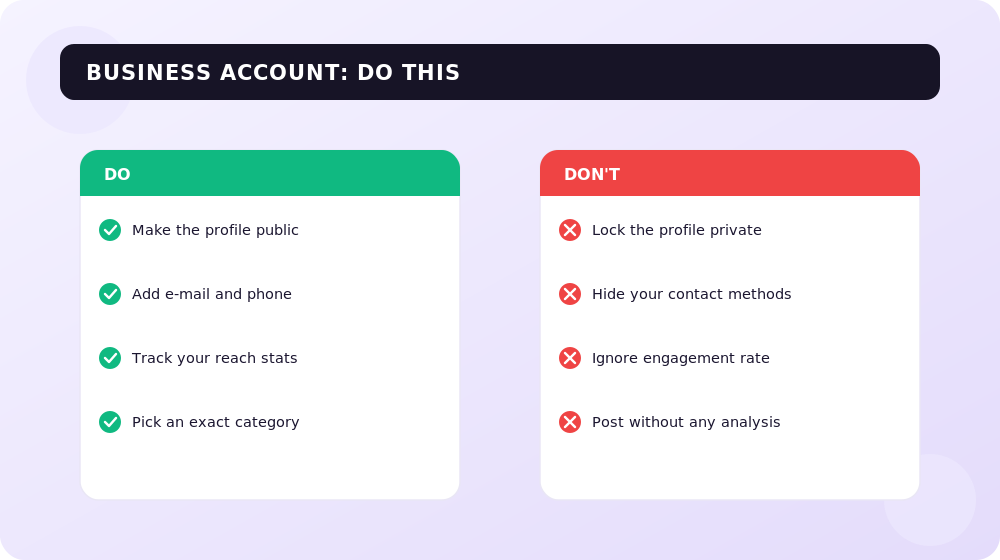
If you are new and not yet selling on Instagram, this chapter is for you. Instagram started as a photo album of memories, but back in 2016 the platform introduced the business account, and later a separate Creator type. Today the app has three profile types, and it is important to understand the difference.
In 2026 all professional features are bundled into the so-called Professional Dashboard — a single section that gathers statistics, growth tools, monetization and ad options. Both business and Creator accounts have access to it.
Personal, Creator and business: the difference in brief
- Personal account — maximum privacy and simplicity. You can make the profile private, with no analytics pressure. But ads, product tags and full Insights are unavailable.
- Creator account — built for bloggers, public figures and influencers. The main advantage is full access to Instagram's music library, including trending tracks from major labels, plus subscriptions, Live badges and the Creator Marketplace for collaborations.
- Business account — for brands, shops, local businesses and service companies. It provides product tags, an address on the profile, Call and Book buttons, and a full ads manager. An important 2026 nuance: business accounts see only a limited, commercially cleared music library — which matters if you make Reels actively.
The key difference of a professional profile from a personal one is that it cannot be private: open access is a condition for growing reach and running ads. You can switch between Creator and Business as many times as you like — it is free and instant.
To simplify the choice: selling products or services — go with Business; earning from ads and content as an influencer and you care about music for Reels — go with Creator.
The professional dashboard and Insights in 2026
People used to complain: a post was shown to thousands but barely got any clicks — and blamed "Instagram's algorithms". In reality the platform has no interest in burning your budget: if the result disappoints you, you won't come back. The cause is almost always weak content and a wrong reading of the data. So you start with statistics.
In April 2026 Instagram reworked the Insights section. It is now a dashboard with three tabs, and every business account owner must understand them:
- Overview — a summary of key metrics: views, reach, profile visits and new follows.
- Engagement — detailed interactions, including two new metrics: share rate (how often content is shared) and skip rate (how quickly viewers swipe away from Reels).
- Audience — follower demographics and activity: cities, age, time online.
Two things to remember about 2026. First, everything is unified into the "Views" metric — separate Plays and Impressions are gone. Second, Instagram head Adam Mosseri has publicly named shares the most important engagement signal of the year: a share is an active recommendation, not a passive like. There is also the Views Over Time metric — it shows how content collects views over weeks and months, helping you find "evergreen" posts.
A high skip rate in the first 2–3 seconds of a Reel is a direct signal of a weak hook. If content is skipped immediately, reshoot the opening. Analyzing this data is the foundation of a content plan: you know exactly whom, when and what to show.
How to make content that actually sells
Good reach starts with quality and emotion. A few rules that still work in 2026:
- Don't sacrifice quality. A poor image subconsciously reads as "cheap product" — don't sign your own death warrant with a blurry frame.
- Don't hard-sell. The best ads sell without clichés like "buy now, discounts, we've been on the market for 20 years". A great example is Oreo's cookie clip: the product is in frame, but the focus is on emotion and the nostalgia of a picnic.
Pick one of two approaches and don't mix them in a single frame: either a complete scene (like Oreo) or a pure focus on the product. The second type is shown well by the Adidas and Prada collaboration — no distracting details, all attention on the product.
And always remember emotions — purchases are made for their sake. The range can be anything, including negative. For example, an eco-activist's stories about the harm of the fur industry strike a nerve, then lead you to buy an eco-fur coat from a specific store.


Positive emotions work even more reliably. Audi posted a photo of actress Maisie Williams in the Audi E-tron Sportback with a caption about confidence in the future — the car is barely visible, but the focus on her smile and gaze sells a state of mind, not metal.
The takeaway is simple: don't turn your profile into a TV-shop. Show what good your product brings into life — and people will want to buy it themselves. For how to systematically boost content with video formats, see our piece on video marketing.
How to create and set up a business account: 4 simple steps
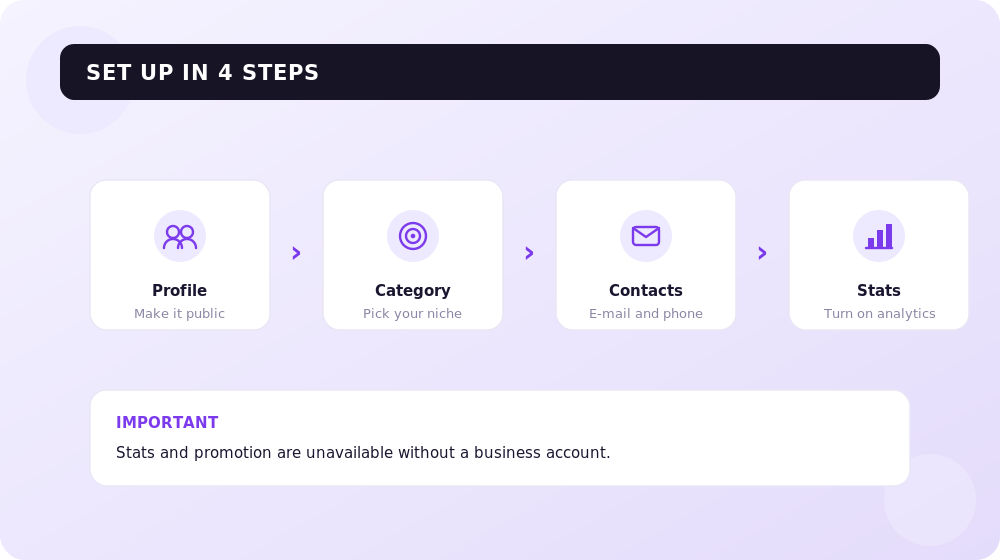
Think setup takes ages? In reality the whole process is under 5 minutes, free and reversible. The only mandatory condition is that the profile must be public. Here is the step-by-step for the app in 2026:
- Open your profile, tap the three lines in the top right corner and go to "Settings and privacy".
- Select "Account type and tools" → "Switch to professional account".
- Choose the category that best describes you (e.g. "Local business", "Clothing brand", "Restaurant"), then select the "Business" type.
- Instagram will auto-fill your contact details — check them. Optionally connect a Facebook Page: this unlocks access to Meta Business Suite and the Meta Ads manager, where you can precisely target ads to the right audience.
Done — you own a business account. Statistics connect immediately, but accurate data appears after a few days of accumulation. If the category from the list isn't perfect, choose the closest one: a poet fits "Writer", and a healthy-lifestyle blogger fits "Fitness trainer".
Contacts, links and address in the profile header
In 2026 a business profile lets you list a work email, phone and physical address — on mobile these turn into action buttons. An important update: Instagram officially supports up to five links in the bio for all account types. Many people used to rely on services like Linktree; now several links can be added natively: in "Edit profile" → the "Links" section → "Add external link". If you need more than five links, external aggregators are still relevant.
Recommended reading:
Product tags, Instagram Shopping and Meta Verified in 2026
For online sales, a business account is also a storefront. In 2026 Instagram Shopping hasn't gone anywhere, but the logic has changed: since autumn 2025 checkout happens on your website, not inside the app. So the catalog, shop and product tags live on Instagram and work for discovery, but the purchase itself completes on your website.
To enable product tags you must comply with Meta's commerce policies, be in a supported country, sell physical goods and connect the account to a Facebook Page you manage. Tag limits in 2026: up to 5 products on a static image, up to 20 in a carousel and up to 30 in a single Reel — and Reels deliver the highest organic reach right now, so they are the main place for tags.
Verification is a separate topic. The classic free "blue checkmark" remains for notable accounts, but in 2026 most businesses go through the Meta Verified subscription. The base tier costs about $11.99 per month when subscribed via the web and $14.99 in the app; there are also pricier plans (Plus, Premium, Max) with extended capabilities. Requirements: 18 or older, a complete profile with a photo and real name, identity confirmation via a document and mandatory two-factor authentication. Verification usually takes 24–48 hours.
Pros and cons of a business account
We already know how and why to switch to a professional profile. But is it all rosy?
Main pros
- Detailed statistics. The updated Insights with share rate, skip rate and Views Over Time give you an understanding of whom, when and what to sell.
- Brand building. A filled-in header and address help you appear more often to local residents in Ukrainian search.
- Trust and sales. A professionally designed account with contacts, product tags and an address inspires more loyalty than a faceless shop that only replies in DMs.
Main cons
- Risk of over-selling. If you fixate on earnings, you lose the aesthetic and the human touch that people come to Instagram for.
- Paid promotion. Followers come more willingly, but almost always for money — opinion leaders and official ads are effective but not free.
- Limited music. A business account can't access the full music library — for Reels that is a real limitation compared with Creator.
How to promote a business account on Instagram
Creating a nice profile is half the job: without promotion, content doesn't sell. A few working tips for 2026:
- Don't skimp on budget. The cost of a follower has risen, but audience quality is higher too: people are oversaturated with content and follow only those who impress them.
- Use official Meta ads. With proper targeting the cost per follower stays low, and the platform itself is interested in your campaigns being effective.
- Work with influencers. People trust people — a blogger's recommendation often converts better than a direct ad.
- Choose the right formats. Bet on Reels as the format with maximum reach, and the details are covered in the article "5 Instagram ad formats".
Approach brand promotion deliberately. And remember: Instagram is just one channel. So that customers find you on Google, it's worth investing in parallel in search engine promotion of your site, and for fast results — in contextual advertising.
Recommended reading:
Frequently asked questions about an Instagram business account
Is an Instagram business account paid?
No. Switching to a business account and all the core features — statistics, contact buttons, product tags, the ads manager — are completely free. You only pay for the ads themselves and, optionally, for the Meta Verified subscription.
What to choose: a business or a Creator account?
If you sell products and services and need an address, product tags and a storefront — choose Business. If you are a blogger or influencer who earns from ads and cares about the full music library for Reels — choose Creator. You can switch between them without limits.
Can I revert from a business account to a personal one?
Yes, at any time and without losses. The professional account settings have an option to switch back to a personal profile. That's exactly why it's worth trying a business account without worry.
Why does a business account have less music in Reels?
Due to licensing. Business accounts get only a commercially cleared track library, whereas Creator accounts get the full one, including trending songs from major labels. If music for Reels is critical — consider the Creator type.
How many links can I add to the profile header?
In 2026 Instagram natively supports up to five links in the bio for all account types. The first one is displayed prominently, the rest in a dropdown menu. If you need more, use external link-aggregator services.
What do the new statistics tabs show in 2026?
Insights are split into three tabs: Overview (views, reach, visits, follows), Engagement (interactions, including share rate and skip rate) and Audience (follower demographics and activity). All metrics are unified into the single "Views" metric.
Conclusions
The future of Instagram belongs to professional accounts: the extended functionality and updated 2026 analytics let you assess your strategy precisely and grow deliberately. Yes, a business account has its cons — paid promotion and limited music — but the pros outweigh them. It's definitely worth trying: you can always return to a personal profile, while the data, product tags and ads manager will give your business what a personal page never will.
H1 vs Title: how many H1 tags you need and how they differ
H1 in SEO 2026: how many H1 headings are acceptable, optimal length, how it differs from title, empty H1 and H1 as an image. Based on a measurement of 77 pages from the Ukrainian top and data on how often Google replaces your title with the H1.
Read →
Google AI Max in 2026: Should You Switch From Performance Max
What Google AI Max is, how it differs from Performance Max, and whether you should switch in 2026. Google's real numbers vs independent data, brand and geo controls, DSA migration. A breakdown by SEOquick.
Read →
Website audit cost in 2026: what the price is built from
31 prices from 13 Ukrainian pages: $33 to $2,035 for the same word. How a report differs from an audit, which free tools still work, which are dead — and what we charge.
Read →Want to apply this to your site?
We will review the current situation, find the first growth levers, and suggest a practical working format.