Google Search Secrets: the Operators That Actually Work in 2026
Half of the 'secret Google operators' from old articles are dead: cache:, link:, info:, and the tilde no longer work. Here's what survived, how to apply operators to SEO tasks, and what changed with the arrival of AI Mode and AI Overviews.


I will look at your site and answer your questions on the topic of this article. 30 minutes, no slide decks, no pressure.
Book a consultationGoogle can find almost anything. The problem is that a regular query returns millions of results, while the document you need sits on page three.
Search operators solve this: a couple of characters in the search box turn Google into a precision tool. Our link builders and SEO analysts use them every day — for indexing audits, duplicate hunting, competitor analysis, and prospecting sites for backlinks.
But a lot has changed since 2019, when the first version of this article came out. Google killed off some operators, added new ones, and on top of that came AI Overviews and AI Mode, which change the very logic of search. I’ve rewritten this guide from scratch: only what works in 2026.
TL;DR: in 2026, the operators that reliably work in Google are quotes ("…"), minus (-), site:, intitle:/allintitle:, inurl:/allinurl:, intext:, filetype:, OR, number ranges (..), the asterisk (*), and the before:/after: date filters. The cache:, link:, info:, related:, tilde (~), and plus (+) operators are officially dead — Google switched them off, and using them is pointless.
Living Google Operators: the Complete 2026 List
Let’s start with the table — this is everything you can rely on. Syntax must be exact: no space after the colon, or the operator won’t fire.
| Operator | What it does | Example |
|---|---|---|
"phrase" | Exact phrase match | "technical site audit" |
-word | Excludes a word or site from results | seo courses -free |
site: | Results from a single domain only | site:seoquick.com.ua audit |
intitle: | Word in the page title (Title) | intitle:checklist |
allintitle: | All query words in the title | allintitle:seo audit checklist |
inurl: | Word in the page URL | inurl:blog |
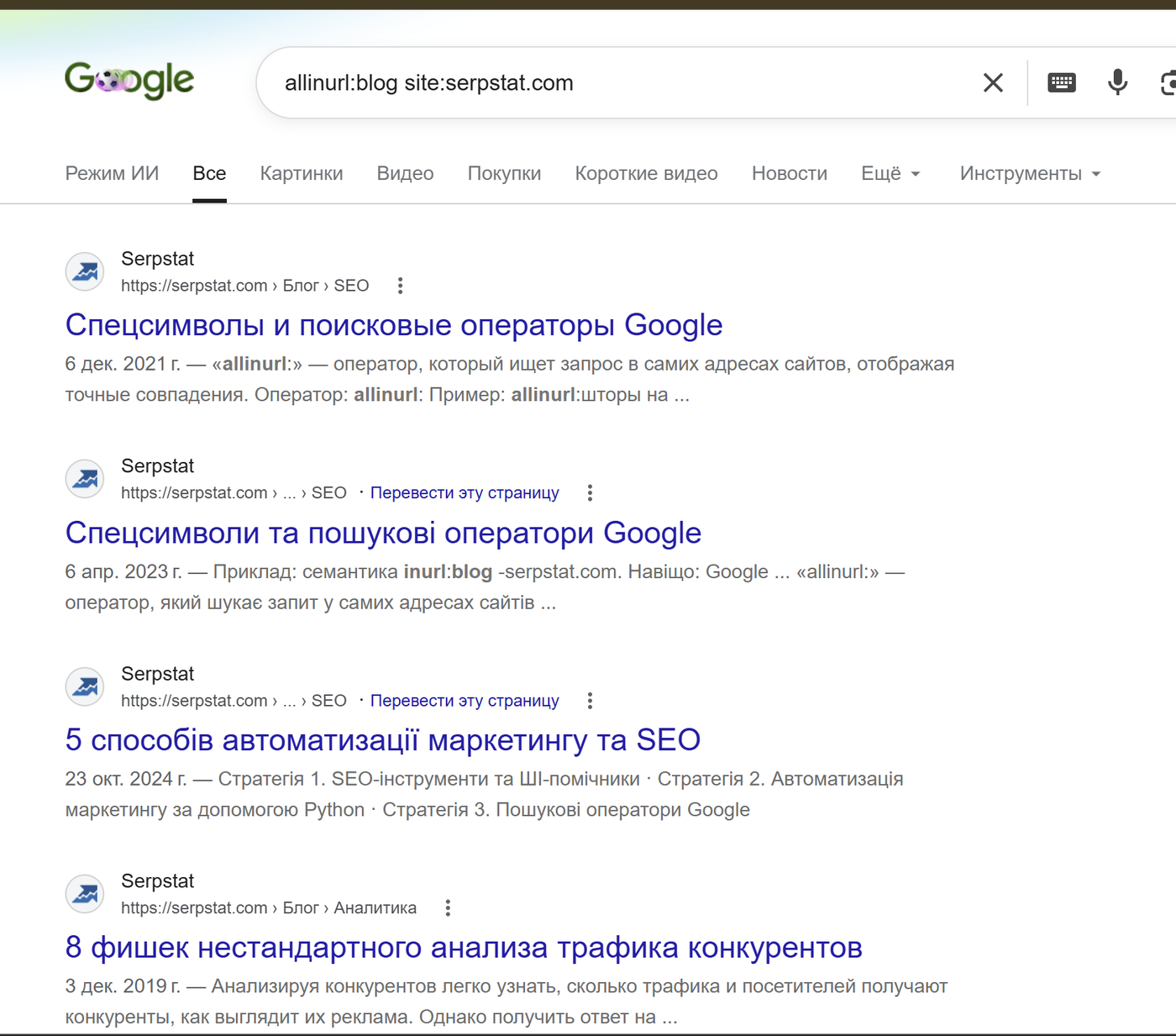
allinurl: | All words in the URL | allinurl:seo audit |
intext: | Word in the page body | intext:"Nikolay Shmichkov" |
filetype: | Files of a specific format | seo guide filetype:pdf |
OR or | | Either condition | seo OR ppc |
( ) | Grouping conditions | (seo OR ppc) site:forbes.com |
.. | Number range | laptop $500..$800 |
* | Any word in this position | "how to * a website in Google" |
before: / after: | Filter by indexing date | core update after:2025-01-01 |
define: | Definition of a term | define:canonical |
Now let’s see how to apply all this, with a focus on SEO tasks.
Quotes and Minus: the Foundation Everything Starts With
Quotes force Google to search for the exact phrase in the exact word order. It’s the fastest plagiarism check there is: put a suspicious sentence in quotes — and you instantly see every page where it appears verbatim.
The minus sign cleans junk out of the results. Looking for CMS reviews but the SERP is flooded with WordPress? The query cms review -wordpress removes it. Minus also works with operators: -site:pinterest.com excludes an entire domain from the results.
An important 2026 caveat: Google “corrects” queries and mixes in synonyms ever more aggressively. Quotes are the only reliable way to tell the algorithm “I know what I’m looking for — don’t help.”
site: — the SEO Specialist’s Main Operator
site:domain.com shows the domain’s pages that are in Google’s index. The applications are endless:
- Quick indexing check.
site:yoursite.com— if there are suspiciously few or suspiciously many pages, that’s a reason to open Search Console. Remember: the “about N results” figure is an estimate; precise data lives only in the GSC “Page indexing” report. - Searching content within a site that has no decent internal search.
site:yoursite.com intentfinds every mention faster than the site’s own clunky search box. - Checking for junk in the index.
site:yoursite.com inurl:utmorsite:yoursite.com inurl:?reveals whether parameterized pages are getting indexed. - Analyzing a competitor’s structure.
site:competitor.com inurl:blog— how many articles they have;site:competitor.com inurl:category— how their catalog is organized.
intitle: and allintitle: — Searching by Titles
intitle:keyword finds pages where the word appears in the Title. allintitle: requires all query words to be in the title.
For SEO this is a competition gauge: if allintitle:"buy pressure canner online" returns just a couple dozen pages, few sites have deliberately optimized their Title for that keyword — the niche is less crowded than the general SERP suggests.
inurl: and allinurl: — Searching by Page URLs
inurl:keyword looks for the word in the URL. It combines with other operators and solves practical problems: site:yoursite.com inurl:test finds forgotten test pages in the index, while inurl:guest-post seo surfaces sites that publish guest posts.
intext: and allintext: — Searching the Page Body
intext: finds the word specifically in the document text, not in the title or links. Its main use is brand mention monitoring: intext:"seoquick" -site:seoquick.com.ua shows who writes about you on third-party sites. Every such unlinked mention is an outreach candidate: ask them to add a link.
filetype: — Searching for Documents
filetype:pdf, filetype:xlsx, filetype:doc — find files of a specific format. This is how you dig up studies, price lists, presentations, and checklists that never show up in regular HTML results. For example: seo checklist filetype:pdf.
The flip side for site owners: the query site:yoursite.com filetype:pdf sometimes surfaces documents you never intended to make public. Check your own domain — the result may surprise you.
OR, Parentheses, and Ranges
OR (always uppercase) combines conditions: buy generator (kyiv OR odesa). The AND operator formally exists but is useless — Google searches for all query words anyway.
The two-dot number range is indispensable in commercial queries: smartphone $400..$600 filters offers by price, and seo conference 2024..2026 — by year.
The asterisk * substitutes for any word inside a quoted phrase: "how to * traffic from Google" matches “increase,” “get,” and “recover” alike.
before: and after: — Date Filters
A relatively fresh pair of operators (Google introduced them in 2019, and they’re still underrated). The format is before:YYYY-MM-DD and after:YYYY-MM-DD; a year alone also works: before:2024.
Real-world examples:
core update site:searchengineland.com after:2026-01-01— everything that outlet published about updates this year.site:competitor.com/blog/ after:2025-06-01— how much content a competitor shipped over the past year.your-brand before:2023— what was written about the company earlier (useful for reputation audits).
A caveat: the operators filter by the dates Google determined at indexing time. If a site doesn’t expose correct publication dates, the filter will misfire — these queries don’t trigger a fresh crawl.

Dead Operators: What No Longer Works
Old articles (including the previous version of this one) still circulate operators Google has officially buried. Let me save you some time:
| Operator | What it did | Status and replacement |
|---|---|---|
cache: | Showed the cached copy of a page | Killed in 2024. Replacement — the Wayback Machine (web.archive.org): Google even added archive links to the “About this result” panel |
link: | Showed links pointing to a page | Switched off back in 2017. Replacement — the “Links” report in Search Console, Ahrefs, Serpstat |
info: | Summary about a page | Killed in 2017 |
related: | Similar sites | Switched off in 2023. Replacement — SimilarWeb, competitor analysis in SEO tools |
~ (tilde) | Synonym search | Killed in 2013 — Google now handles synonyms automatically |
+ (plus) | Forced word inclusion | Killed in 2011 (handed over to Google+, which also died). Replacement — quotes |
inblogtitle:, inpostauthor: | Blog search | Died together with Google Blog Search in 2011 |
The same graveyard holds URL-parameter tricks like &pws=0 (disabling personalization) and google.com/ncr — they no longer affect the results. If you need another region’s SERP without personalization, use a VPN or the &gl= parameter combined with incognito mode; and for rank checking — proper rank trackers, not manual searches.
SEO Tasks You Can Solve with Operators
Now let’s assemble the operators into working combos. This is what our team uses on real projects.
Site Indexing Audit
The starter kit for any audit:
site:yoursite.com— the overall picture of the index.site:yoursite.com -inurl:blog -inurl:category— what’s in the index besides the main sections: tags, pagination, and technical pages often float up.site:yoursite.com inurl:utm OR inurl:gclid— duplicates with ad-tracking parameters.site:yoursite.com filetype:pdf— documents in the index.site:m.yoursite.comorsite:staging.yoursite.com— whether subdomains that shouldn’t be there got indexed. Staging environments in the SERP are a classic duplicate leak.
Hunting Duplicate Content
Take a distinctive sentence from a page (5–10 words), wrap it in quotes, and add -site:yoursite.com. If other sites show up, your content was copied (or you weren’t the copywriter’s first buyer). The query "that same sentence" site:yoursite.com reveals internal duplicates — identical product card descriptions, texts multiplied across regional pages.

SEOquick case study: for Belsta, a Ukrainian furniture e-commerce store, we ran an index audit after the March Core Update — using site: + inurl: combos among other things — cleaned out junk pages, and reworked the templates. The result: +156% organic traffic in 6 months. Details in the case study on growing an online store in Ukraine.
Competitor Analysis
site:competitor.comversussite:yoursite.com— who has more indexed content.site:competitor.com intitle:"buy"— how many commercial pages are optimized for transactional keywords.site:competitor.com after:2025-06-01— the competitor’s publishing pace over the year."a phrase from the competitor's text"in quotes — where they place guest posts and press releases: duplicated paragraphs surface on donor sites.
Link Building Prospecting
Our link builders’ favorite section. Guest post opportunities are found with combos like:
your topic intitle:"write for us"oryour topic intitle:"become a contributor".your topic inurl:guest-post OR inurl:contribute.intext:"your brand" -site:yoursite.com— unlinked mentions for outreach.competitor1 OR competitor2 intitle:review -site:competitor1.com— review sites that mention competitors but not you.
SEOquick case study: for the SWEETCV project we built links through scholarship outreach — finding .edu and .gov sites with operators like
site:.edu inurl:scholarships. The outcome: growth from 10,000 to 55,000 visits per month. Details in the case study on usability improvements and link building.
Operators in the AI Search Era
Since 2024–2025, Google’s results page has stopped being “ten blue links”: AI Overviews appeared on top, followed by the full-blown Gemini-powered AI Mode. This changes how operators behave, too.
Operators and AI Overviews
Good news for precision-search fans: queries with operators generally don’t trigger AI Overviews. Combos with site:, filetype:, or quotes signal to Google that the user wants the classic SERP, not a summary. The AI overview shows up only where the system deems it a useful addition.
Two user tricks grew out of this:
- Add
-aito the end of a query — the results open without an AI Overview (a trick confirmed by 9to5Google journalists in 2026). - The
&udm=14parameter in the results URL switches on “web only” mode — clean links without AI blocks, videos, or carousels. You can even save it as a separate search engine in your browser.
For an SEO specialist these are working tools: when you’re analyzing the real organic SERP, AI blocks only get in the way.
Google Operators vs. ChatGPT Search
Many people have moved their searching to ChatGPT — so the natural question is: do operators work there? Directly — no. ChatGPT Search doesn’t parse intitle: or filetype: as commands. But here’s the interesting part: under the hood, it uses operators itself. A Search Engine Land analysis showed that when answering, ChatGPT splits a question into a dozen sub-queries (query fan-out) and applies site: to restrict the search to trusted domains.
The practical takeaway is twofold:
- As a user — in ChatGPT, operators are replaced with plain wording: “find PDF studies on voice search only on .edu sites from 2025.” The model converts that into filters itself.
- As an SEO specialist — since AI search engines split queries and pull specific sites, your job is to get your domain into those fan-out queries. That’s GEO territory: I covered how generative search optimization works in my article on GEO optimization for GPT, and how to prepare content that AI answers actually cite in the piece on content for AI answers.
That said, keep the scale in perspective: according to Sedestral (2026), Google holds about 90% of the global search market, while ChatGPT is only a share of the AI segment. Google operators will remain the primary precision-search tool for a long time yet.

SEOquick case study: AI search results are not an abstraction but a measurable channel. A medical website of one of our clients appears in Google’s AI answers for 26,714 queries, and the service website “Dobro Liudiam” — for 1,478. We grow these numbers deliberately with direct-answer content. Case studies: medical website promotion and service website promotion.
AI Mode + Lens: Searching by Image Instead of Query
Some tasks that used to require clever text queries are now solved faster with visual search. Google Lens is built into AI Mode: you can photograph or upload an image and ask questions about it — the system recognizes every object in the picture and runs a series of queries on it (the same fan-out, just starting from an image).
For work, this is useful in two scenarios:
- Reverse image search — finding out who uses your photos and infographics without attribution. Right-click an image → “Search with Google Lens,” or use the camera button on google.com. Every found usage is a reason to request a link to the original source.
- “About this image” — the feature shows when a picture first entered Google’s index and where else it’s published. Handy for fake-checking and verifying the uniqueness of visual content.
“About This Result”: Fact-Checking in Three Clicks
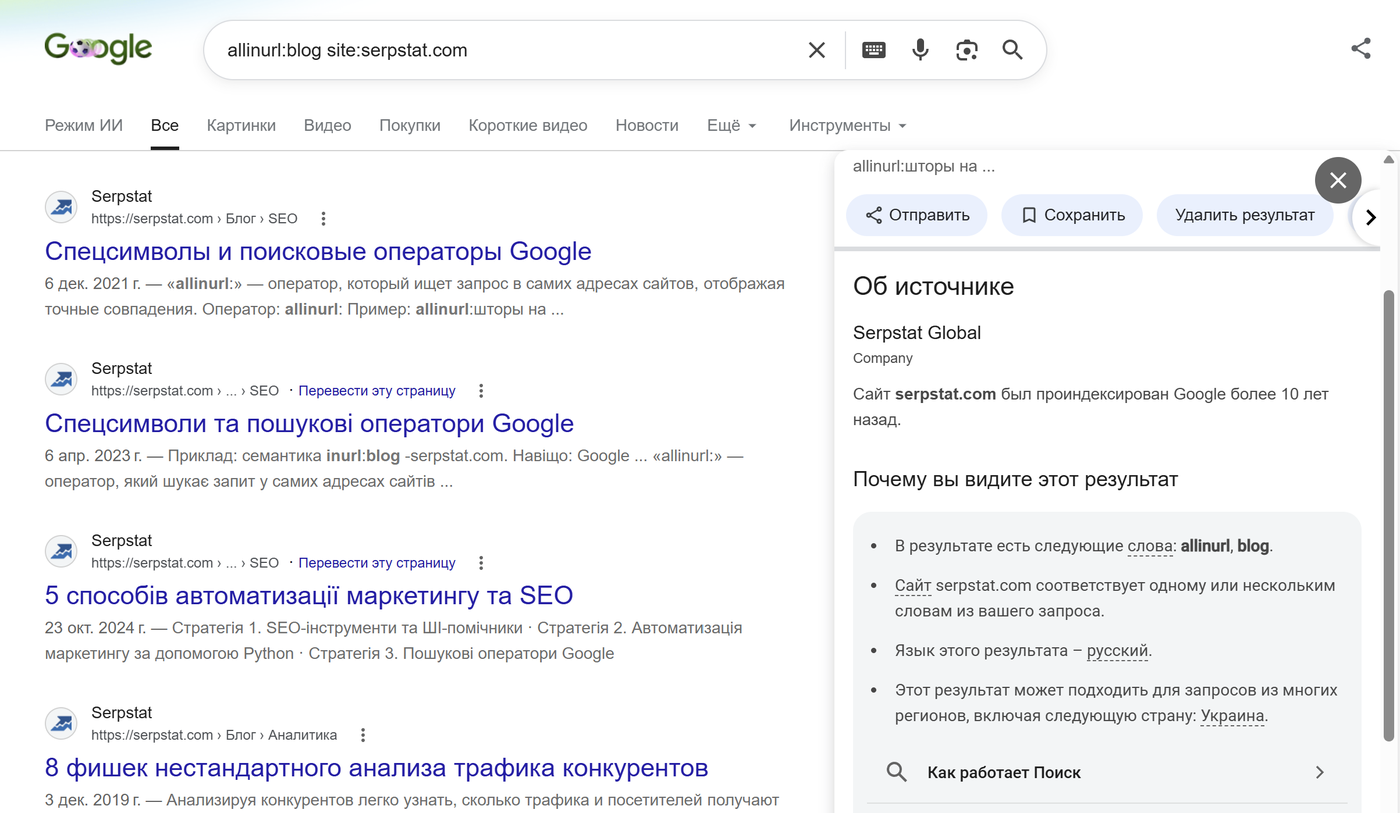
Next to every search result there’s a three-dot menu — the “About this result” panel. It shows what Google knows about the source: the site’s description from Wikipedia, when the domain was first indexed, whether the connection is secure — and provides a link to an archived copy of the page (the very replacement for the dead cache:).
For SEO it’s a quick way to vet a potential link donor before placing a backlink: a domain indexed three months ago with zero mentions anywhere on the web is a poor candidate.
What’s Left of the Everyday Search Tricks
A few tricks from the old article are still alive and useful — a quick run-through:
define:word— an instant definition of a term right in the results.- Weather, currencies, calculations — queries like “weather Odesa,” “100 USD to UAH” (Ukraine’s currency, the hryvnia), or any math expression are computed right in the SERP, no site visits needed.
- Search suggestions — still a free source of keyword ideas: start typing a keyword and watch what Google offers to complete. AI tools are handy for automating this — I’ve collected a set of ready-made prompts in 50 mega-prompts for ChatGPT and Gemini in SEO.
- Advanced Search (google.com/advanced_search) — the same operator set as a form: language, region, last update, file type, usage rights. Slower than operators, but a lifesaver when the syntax slips your mind.
Conclusions
In 2026, Google operators remain one of the most underrated tools in an SEO specialist’s kit. Free of charge and within minutes, they handle tasks that would otherwise require paid services: indexing checks, duplicate hunting, competitor reconnaissance, donor prospecting.
The key is to use the current set. Remember three things:
- The working core: quotes, minus,
site:,intitle:,inurl:,intext:,filetype:,OR,..,*,before:/after:. - Dead and not coming back:
cache:,link:,info:,related:,~,+. The replacements are the Wayback Machine, Search Console, and third-party SEO tools. - AI search didn’t kill operators — it complemented them: an operator query is a way to get the classic SERP without an AI overview, and inside ChatGPT the same operators work under the hood. For how to use the AI models themselves in SEO work, read the complete ChatGPT for SEO guide.
What operator combos do you use? Share them in the comments.
FAQ
Which Google operators work in 2026?
Reliably working: quotes for exact phrases, minus for exclusion, site:, intitle:, allintitle:, inurl:, allinurl:, intext:, filetype:, OR, the two-dot number range, the asterisk wildcard, and the before:/after: date filters. Syntax is strict: no space after the colon.
Why doesn’t the cache: operator work?
Google fully disabled cache: in 2024 and removed cached-copy links from the results. To view an old version of a page, use the Wayback Machine (web.archive.org) — an archive link is also available in the “About this result” panel next to the snippet.
What replaces the link: operator for backlink analysis?
The link: operator has been dead since 2017. For your own site, check the “Links” report in Google Search Console — that’s the most accurate data. For analyzing other sites you need third-party tools: Ahrefs, Serpstat, Semrush — Google has no public backlink analysis tool.
Can site: tell you the exact number of indexed pages?
No. The “about N results” figure is a rough estimate that changes from query to query. site: works for quick diagnostics and finding junk in the index, but the exact number of indexed pages is shown only in the “Page indexing” report in Search Console.
Do Google operators work in ChatGPT Search?
Not directly — ChatGPT doesn’t interpret intitle: or filetype: as commands. Instead of operators, describe the filters in words: “find PDFs only on .gov sites from 2025.” Interestingly, ChatGPT itself uses site: in its sub-queries when searching trusted sources.
How do I remove the AI Overview from Google results?
Two ways: add -ai to the end of your query, or append the &udm=14 parameter to the results page URL — it switches on “web only” mode without AI blocks. Besides, most operator queries (site:, filetype:, quotes) don’t trigger an AI Overview anyway.
Making Money Online in 2026: Which Methods Actually Work
An honest breakdown of making money online in 2026: why 'easy money with no investment' is a myth, 5 models that actually work, and how to monetize your own site with affiliate and CPA — by SEOquick.
Read →
Best SaaS SEO Agencies in 2026 and What They Charge
Nine pages seriously compete for this search in the US — after that Google pads the results with the IAEA and DARPA. The real price range starts at $5,000 a month and runs to $40,000, nine of seventeen agencies rebranded around AI search this year, and I am not first on my own list.
Read →
Website audit cost in 2026: what the price is built from
31 prices from 13 Ukrainian pages: $33 to $2,035 for the same word. How a report differs from an audit, which free tools still work, which are dead — and what we charge.
Read →Want to apply this to your site?
We will review the current situation, find the first growth levers, and suggest a practical working format.